Digital transformation should make a business easier to run, easier to understand, and easier for customers to deal with. This guide helps SME leaders decide what to modernise, where AI and automation can genuinely help, what risks to consider, and how to prove that technology has actually improved the business.
Before choosing a platform, AI tool or automation system, I find it useful to reduce digital transformation to seven business decisions. The visual below shows the questions I would ask before committing money, time or management attention.
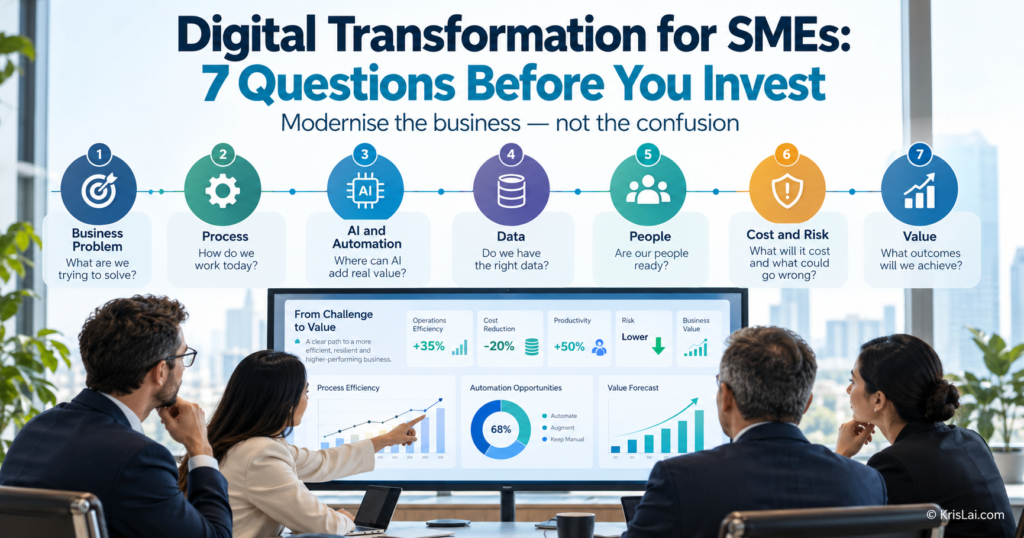
The order matters. Start with the business problem and finish with measurable value. Technology sits in the middle because it is a means to an outcome, not the outcome itself.
Technology is getting easier to buy…
That does not mean it is getting easier to choose wisely.
A new AI tool, CRM, accounting platform, automation system, dashboard, or cloud service can look impressive in a demonstration. But if it solves the wrong problem, adds another disconnected system, or makes staff create new workarounds, you have not transformed the business.
You have simply digitised the confusion!
In my experience, the most useful digital transformation question is therefore not:
“Which technology should we buy?”
It is:
“What business problem are we trying to solve, and what is the best way to solve it?”
That changes everything…
What this article covers
This guide explains:
- what digital transformation means for SMEs
- the difference between digitisation and digital transformation
- how to assess your current level of digital maturity
- the seven questions SME leaders should ask before modernising
- which business processes are good candidates for automation
- where AI can help — and where human judgement still matters
- how data quality and system integration affect digital transformation
- how to get employees and customers to adopt a new system
- how to calculate the real cost and potential value of digital change
- how cybersecurity and privacy fit into transformation decisions
- how digital transformation affects customer search and buying behaviour
- how to test a change before scaling it across the business
Table of Contents
- What is digital transformation for SMEs?
- Digital transformation vs digitisation
- How digitally mature is your business?
- 1. What business problem are we actually trying to solve?
- 2. Should we fix the process before we digitise it?
- 3. Where should AI or automation help?
- 4. Are our data and systems ready to work together?
- 5. Will our people and customers actually use the change?
- 6. What will this really cost — and what risks are we accepting?
- 7. How will we prove value before we scale?
- How does digital transformation improve operational efficiency?
- How does digital transformation affect the future of search?
- What this looks like in real business
- Where this goes wrong
- The KrisLai Decision Framework™
- What you should actually do
- People Also Ask
- Frequently Asked Questions
- Start with the business problem, not the technology.
- Improve a poor process before trying to automate it.
- Use AI where it improves a clear task, decision, or customer outcome — not simply because AI is available.
- Data quality and system integration often matter more than adding another tool.
- Technology adoption is partly a behavioural problem: people must understand, trust, and use the new process.
- Measure the full cost of digital change, including migration, training, integration, management time, and risk.
- Test one transformation before scaling it across the business.
Digital transformation is the deliberate redesign of how a business works using digital technology, data, automation, and AI to improve a measurable business outcome. It is not simply buying new software, moving files to the cloud, or adding an AI tool to an existing process.
Think of digital transformation like renovating a workplace…
Imagine renovating an office while people are still working inside it.
You would not begin by buying some fashionable furniture and then spend the next six months wondering where to put it.
You would first ask:
What is not working?
Where do people get stuck?
What space is wasted?
What must continue working while the changes happen?
Who actually uses each area?
What will make the finished workplace better?
Digital transformation works in much the same way.
The technology is the furniture, wiring, equipment, and infrastructure.
But the real transformation comes from redesigning how the place works.
That is why adding technology to a poor process can simply create a more expensive poor process.
If the tool is not the starting point, what is?
So if digital transformation should not start with software, AI, or automation, where should an SME leader begin?
With decisions.
Before spending money or asking staff to change how they work, I would ask seven questions…
An SME should start digital transformation by identifying one important business problem, mapping the current process, removing unnecessary steps, deciding where technology could improve the outcome, and testing the change on a small scale. Measure the result before investing more money or extending the change across the business.
What is digital transformation for SMEs?
Digital transformation for SMEs means changing how work is done using digital technology to solve real business problems. It may involve automation, AI, cloud software, data analytics, CRM, digital accounting, or connected workflows, but the aim should always be a better business outcome rather than technology adoption itself.
That distinction matters.
Most SMEs are already digital to some degree.
They use:
- online banking
- cloud documents
- accounting software
- CRM systems
- websites
- online booking
- messaging apps
- AI tools
The question is no longer simply whether a business is digital.
The question is:
Does all this technology actually make the business work better?
The UK Business Data Survey 2026 found that 99% of small businesses with 10–49 employees and 99% of medium businesses with 50–249 employees handled digitised data.
Yet only 35% of those small businesses and 49% of medium businesses said they analysed data to generate new insights.
That gap tells us something important:
Having digital data is not the same as creating value from it.
Source: UK Business Data Survey 2026Digital transformation should close that kind of gap.
What is the difference between digitisation and digital transformation?
Digitisation converts information or tasks from manual or physical formats into digital ones. Digital transformation goes further by changing the process, decision, or customer experience around that technology. Scanning paper invoices is digitisation; redesigning the invoicing process so data flows automatically from completed work to payment is transformation.
Here is a simple comparison:
| Digitisation | Digital transformation |
|---|---|
| Paper form becomes an online form | Form data automatically updates the relevant workflow |
| Spreadsheet replaces a notebook | Connected system removes duplicate entry and provides live information |
| Invoices become PDFs | Completed work triggers invoicing automatically |
| Customer records are stored digitally | CRM data improves follow-up, service, and decision-making |
| AI writes an email | AI improves part of a measured business process with clear human oversight |
This distinction prevents a lot of expensive confusion.
Buying new software is not transformation.
It may be part of transformation.
But only if the way the business works actually improves.
The UK government’s Making Tax Digital (MTD) programme is a useful example of digitisation driven partly by regulation rather than by a company’s own transformation strategy.
All VAT-registered businesses are now required to keep certain VAT records digitally and submit VAT Returns using compatible software, unless an exemption applies.
Making Tax Digital for Income Tax is being introduced in stages for qualifying sole traders and landlords. As of September 2026:
- qualifying income above £50,000 came into scope from 6 April 2026
- qualifying income above £30,000 comes into scope from 6 April 2027
- qualifying income above £20,000 comes into scope from 6 April 2028
MTD does not mean every UK business faces exactly the same requirements. Always check the current HMRC rules for your circumstances.
The wider business lesson is useful, however. If regulation forces you to change how records are kept, do not automatically treat it as a box-ticking exercise. Ask whether the same change can reduce duplicate entry, improve reporting, speed up invoicing, or provide better financial information.
Check current Making Tax Digital for Income Tax guidance on GOV.UK
How digitally mature is your business?
Digital maturity describes how effectively a business uses technology rather than simply how many tools it owns. A useful SME assessment looks at whether work is still mainly manual, merely digitised, connected across systems, automated where appropriate, or supported by reliable data and better decision-making.
Before deciding what technology to add next, it helps to understand where the business is starting from. I use this simple five-stage model to make that assessment easier:
The KrisLai Digital Maturity Ladder
Manual → Digitised → Connected → Automated → Decision-Supported>
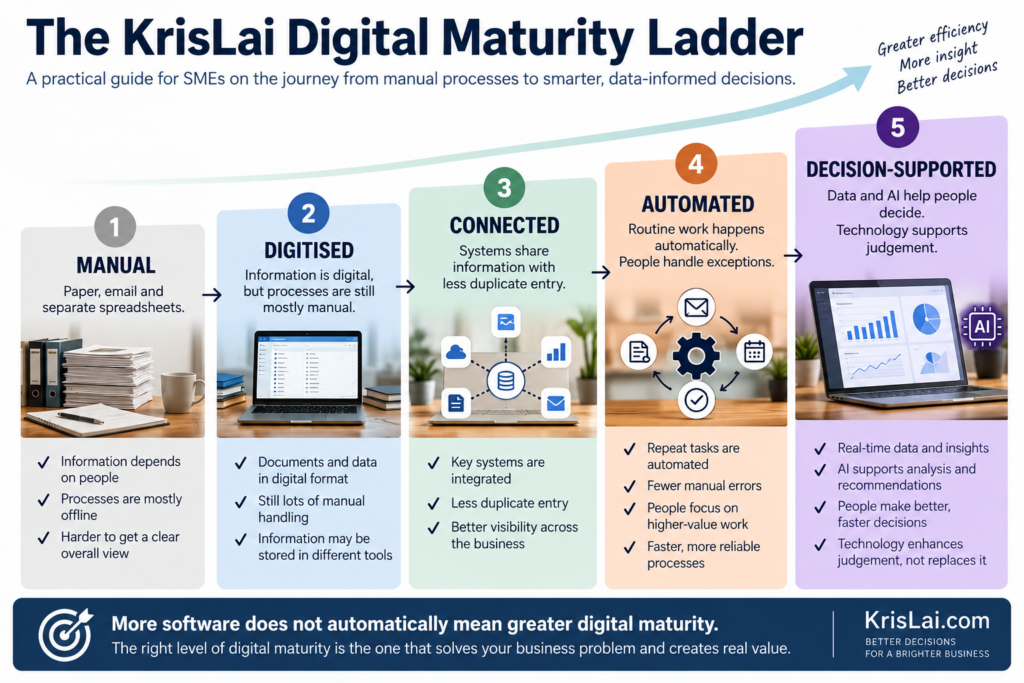
The aim is not to reach the top of the ladder as quickly as possible. The aim is to move to the next useful level where the business problem justifies it.
1. Manual
Information is largely held in:
- paper
- people’s heads
- separate spreadsheets
Work depends heavily on individual knowledge.
2. Digitised
The information is digital, but processes may still be manual.
Example:
Invoices are PDFs, but somebody still copies the details into another system.
3. Connected
Systems begin sharing data.
For example:
A booking updates the schedule.
The completed job updates the CRM.
The CRM passes information into accounting.
4. Automated
Reliable, repetitive work happens with limited manual intervention.
Examples:
- automatic reminders
- invoice generation
- status updates
- routine data entry
- workflow triggers
5. Decision-Supported
Technology does more than process work.
It helps people decide.
Dashboards reveal bottlenecks.
AI summarises information.
Data shows customer patterns.
Forecasts support planning.
Exceptions are highlighted before they become serious.
A business with fifteen disconnected software subscriptions may be less digitally mature than a business using four well-integrated systems. Maturity is about how effectively information, processes, people, and decisions work together — not the size of the software bill.
This ladder is my practical model, not an official industry standard.
Its purpose is simply to make the next decision clearer.
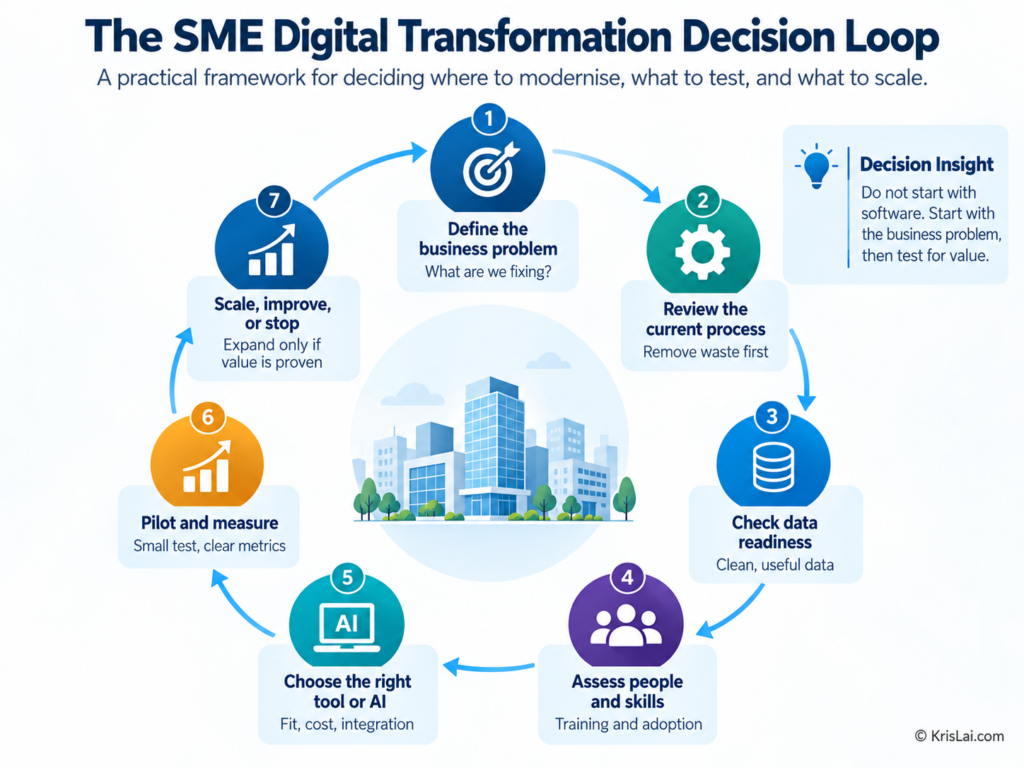
Now we can move to the seven questions:
1. What business problem are we actually trying to solve?
Every digital transformation project should begin with a clearly defined business problem rather than a chosen technology. Describe the problem in practical terms, identify who experiences it, measure its current effect, and define the outcome you want. Only then should you consider software, automation, or AI.
Weak starting point:
“We should use more AI.”
Better:
“It takes our team three days to prepare a customer quotation.”
Or:
“Staff enter the same customer information into three different systems.”
Or:
“Managers wait until the end of the month to discover that overtime has increased.”
Those are problems you can investigate.
Define the problem in four parts
Ask:
1. What is happening?
Be specific.
2. Who experiences the problem?
Staff?
Customers?
Managers?
Suppliers?
3. What does it currently cost?
Think about:
- time
- mistakes
- delays
- lost customers
- management effort
- cash flow
4. What outcome would be better?
For example:
Reduce quote preparation from three days to four hours.
Now the technology has a job to do.
Use a simple problem statement
Try:
“Our current [process] causes [problem], which affects [people/outcome]. We want to improve [measurable result].”
Example:
“Our current job-completion process requires information to be entered twice, which delays invoicing and creates errors. We want invoices issued within 24 hours of completed work.”
That is a transformation brief.
“Let’s get some AI” is not!
2. Should we fix the process before we digitise it?
Yes, in many cases you should improve the process before automating it. Technology can remove repetitive work, but it can also lock unnecessary steps into a system. Map the current process, remove waste, simplify handovers, clarify ownership, and then decide which remaining tasks should be digitised or automated.
Before choosing an automation tool, I find it useful to make the process stable enough to understand. This simple sequence helps expose where the real problem sits before technology is added:
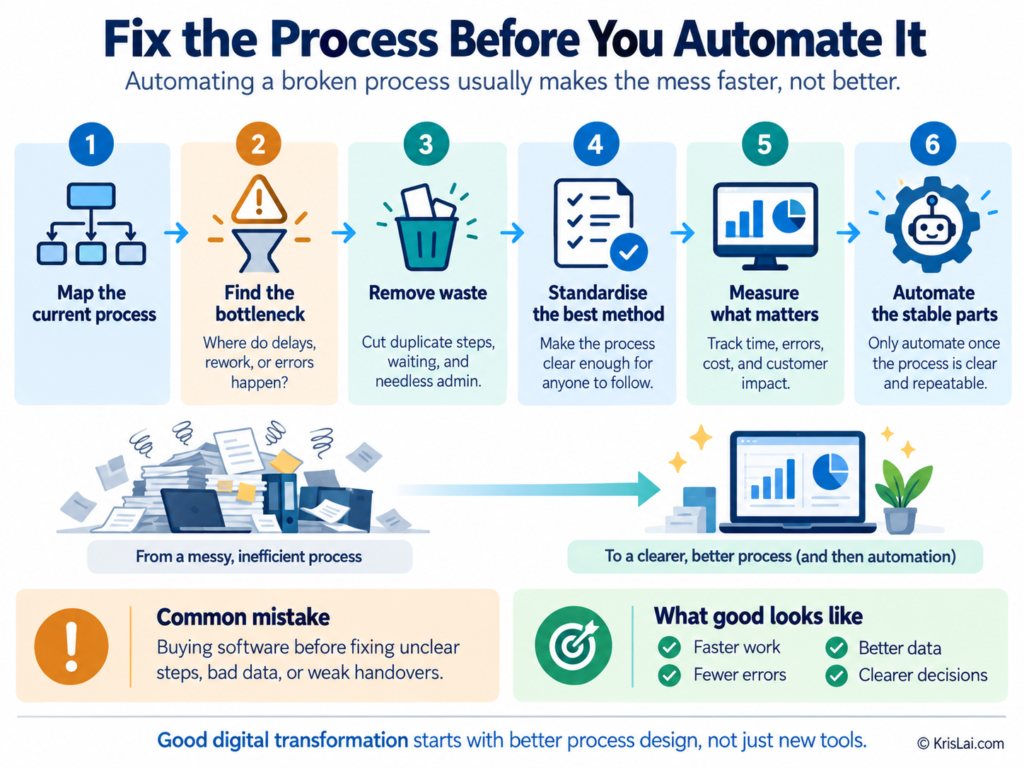
The important point is not that every business must follow these stages rigidly. It is that automation should come near the end of the thinking, not at the beginning. If delays, duplicate work, weak handovers, or unclear ownership already exist, technology may simply reproduce them at greater speed.
Use this six-step sequence
Map → Diagnose → Remove → Standardise → Measure → Automate
The order matters! Each stage gives you information you need before moving to the next. If you jump straight to automation, you risk building technology around a problem you have not properly understood.
1. Map the current process
Start by writing down what actually happens from beginning to end.
Do not map the process as the procedure manual says it should work. Map what people really do on a busy Monday morning.
Ask:
- Where does the process start?
- Who touches it?
- What information moves between people?
- Where does somebody wait?
- Where is data copied or entered again?
- Where does the process normally finish?
For example, a customer enquiry might move through:
Enquiry → Quote → Approval → Schedule → Delivery → Completion → Invoice → Payment
Once you can see the whole journey, the weak points become much easier to spot.
2. Diagnose the bottleneck
Next, find the part of the process that creates the most delay, rework, errors, or frustration.
Do not assume the slowest-looking step is automatically the real problem.
An invoice may take three days to issue, for example, but the finance team might not be the bottleneck. The real problem could be that job-completion information takes two days to reach them.
Look for:
- queues
- repeated chasing
- missing information
- errors
- rework
- manual handovers
- approvals that regularly hold things up
Ask:
“If we improved only one part of this process, which change would make the biggest difference?”
That is usually a better starting point than asking which software to buy.
3. Remove Waste
Once you know where the friction sits, remove work that does not need to be there.
Ask of every step:
Does this add useful value, reduce risk, or provide information someone genuinely needs?
If not, challenge it.
Waste might include:
- duplicate data entry
- reports nobody reads
- unnecessary approvals
- repeated checking
- waiting for information that could be available automatically
- copying data from one system to another
- fixing avoidable mistakes
Be careful here!
The goal is not to remove every human step.
Some checks exist for good reasons.
The job is to distinguish between useful control and habit that has survived because nobody questioned it.
Standardise the best method
Before automating a process, make the improved version clear enough that different people can follow it in roughly the same way.
Decide:
- who owns each step
- what information is required
- what should happen next
- what counts as an exception
- when another person needs to become involved
For example, instead of every manager handling a customer complaint differently, you might create a simple standard:
Record → Categorise → Resolve → Escalate if required → Confirm with customer → Close
Standardisation does not mean turning people into robots.
It means removing avoidable variation where consistency helps.
This also makes later automation much safer because the technology is supporting a process people already understand.
Measure what matters
Before automating, establish a simple baseline.
Otherwise, you may install a new system and have no reliable way to know whether it actually improved anything.
Measure what matters to the original problem.
That might include:
- process time
- staff hours
- error rate
- customer waiting time
- rework
- cost per transaction
- number of manual touches
Suppose quotations currently take an average of 48 hours.
That becomes your baseline.
After the change, perhaps the average falls to eight hours.
Now you have evidence.
Without the baseline, you are left with:
“The new system feels faster.”
Useful as an impression. Less useful as an investment case.
Automatethe stable parts
Only now should you decide which parts are suitable for automation.
The strongest candidates are usually tasks that are:
- repetitive
- predictable
- rules-based
- high-volume
- stable enough to describe clearly
Examples might include:
- sending appointment reminders
- creating routine invoices
- moving approved information between systems
- triggering follow-up emails
- updating job status
- producing regular reports
Keep human judgement where:
- the situation is unusual
- the consequences are significant
- a customer relationship matters
- the information is uncertain
- an exception needs interpretation
The aim is not to automate everything.
The aim is to automate the parts where technology genuinely makes the process faster, more reliable, or easier to manage.
There is a Chinese saying: “欲速则不达” (yù sù zé bù dá).
Roughly:
“Haste does not bring success.”
It fits digital transformation surprisingly well.
The rush to automate can easily make the final solution worse.
If different employees complete the same task in completely different ways, automation is usually premature. First agree on the best workable process. Otherwise, you may spend good money automating confusion — which is still confusion, just with a monthly subscription.
The important point is that automation sits at the end of this sequence.
First understand the work.
Then find the constraint.
Remove unnecessary activity.
Create a repeatable method.
Measure the current result.
Only then automate the stable parts.
That is how digital transformation improves the process instead of simply making an inefficient process run faster.
If a process contains unnecessary approvals, duplicate data entry, unclear ownership, or pointless reporting, automation can make those problems happen faster. Improve the workflow first. Then automate what deserves to remain.
3. Where should AI or automation help — and where shouldn’t it?
AI and automation work best when they improve a clearly defined task, decision, or workflow. Use automation for predictable rules and repetitive activity, and AI for tasks such as summarising, analysing, classifying, drafting, or finding patterns. Keep meaningful human oversight where consequences, judgement, relationships, or uncertainty are high.
The important distinction is between three kinds of work.
| Type of work | Best approach | Example |
|---|---|---|
| Predictable and repetitive | Automate | Send appointment reminders |
| Information-heavy | AI assist | Summarise customer feedback |
| High judgement / high consequence | Human-led | Decide whether to dismiss an employee or end a major customer relationship |
AI can be useful for:
- drafting routine communications
- summarising meetings
- classifying enquiries
- analysing customer feedback
- finding trends in reports
- forecasting
- searching internal knowledge
- creating first drafts
- highlighting unusual activity
But ask a harder question:
What happens if the AI is wrong?
If the consequence is trivial, light oversight may be enough.
If the consequence affects:
- money
- safety
- employment
- customer rights
- security
- legal obligations
then the human role becomes much more important.
The UK Business Data Survey 2026 found that AI is already being used by 51% of small businesses and 58% of medium businesses that handle digitised data. However, only 21% of AI-using businesses said their AI tools were integrated into existing business systems.
That tells me the next phase is not simply “use more AI”.
It is:
integrate the right AI into the right process.
For a deeper look at the tools themselves, see:
Adopting AI-Powered Tools in Small Businesses4. Are our data and systems ready to work together?
Your systems are ready for digital transformation when important information has a clear home, staff know which version to trust, and data can move between key processes without repeated copying. You do not need perfect technology. You need reliable information, clear ownership, and fewer points where data can become duplicated, outdated, or lost.
This sounds technical.
It does not need to be.
You can learn a great deal about your digital readiness with a piece of paper and 30 minutes.
Start by following one piece of information
Choose something important.
For example:
a new customer enquiry.
Now ask what happens to that information.
In a service business, it might look like this:
Website enquiry → Email → Quotation spreadsheet → CRM → Scheduling system → Job sheet → Accounting software
Now ask:
How many times does somebody type the same information?
Perhaps the customer’s:
- name
- address
- telephone number
- service requirement
- price
gets entered four times.
That is not simply an admin inconvenience.
Every manual copy creates another opportunity for:
- typing errors
- old information
- missing information
- staff time
- different versions of the truth
Use this simple four-question system check
For each important piece of business information, ask:
1. Where is it created?
Where does the information first enter the business?
For example, a customer completes an online enquiry form.
2. Where should the trusted version live?
Choose one main home.
Perhaps the CRM should contain the official customer record.
That means people should not have to wonder whether the CRM, spreadsheet, email, or someone’s notebook contains the latest address.
3. Where else does the information need to go?
The customer details may need to reach:
the quotation system;
scheduling;
operations;
and accounting.
Draw arrows between them.
You are now creating a very basic systems map.
4. Where are people copying information manually?
Put a circle around every point where somebody:
copies;
retypes;
downloads;
uploads;
or checks one system against another.
Those circles are your integration opportunities.
A practical example
Imagine a commercial service company receives an online request for a quotation.
The office administrator copies the enquiry into a spreadsheet.
The sales manager uses the spreadsheet to prepare the quotation.
When the customer accepts, somebody creates the customer again in the scheduling system.
After the first job, the finance team creates the customer once more in the accounting package.
Three departments are doing their jobs correctly.
Yet the business has created the same customer three times!
Now imagine the customer changes their billing email.
Which record gets changed?
Possibly one.
Maybe two.
Probably not all three.
Six months later, somebody says:
“Why does the system keep using the wrong email address?”
The system may not be the real problem.
The information has never had one trusted home.
Now redesign the flow
A better version might be:
Online enquiry → CRM → Quote → Accepted job → Schedule → Completion → Accounting
The important difference is not the number of boxes.
It is that information moves forward rather than being recreated at every stage.
You do not necessarily need an expensive custom system to achieve this.
Your existing software may already offer:
native integrations;
workflow automation;
data imports;
or connections through automation services.
The business requirement should come first:
“Enter important information once and reuse it safely.”
Then investigate the simplest technology capable of doing that.
Use a red, amber, green test
GREEN — Ready
Information has a clear home.
Systems exchange the data reliably.
Staff know which record to trust.
Little manual copying is required.
AMBER — Needs work
Some information is connected, but spreadsheets, exports, or manual checks are still needed.
There is occasional confusion about which version is current.
RED — Fix this before adding more technology
The same information exists in several systems.
Nobody knows which version is correct.
Staff maintain their own spreadsheets.
Reports need considerable manual cleaning.
Important data is missing or inconsistent.
If your process is mostly red, adding AI should not be the first priority.
Fix the information flow first.
Businesses sometimes try to connect every existing system because replacing any of them feels difficult. But connecting five overlapping tools can preserve the very complexity you are trying to remove.
Before asking, “How do we integrate these systems?”, ask:
“Do we still need all of them?”
Sometimes the best integration project is deleting a system from the diagram.
What about AI?
This matters even more when AI enters the workflow.
AI can summarise, analyse, classify, and make recommendations based on the information it receives.
But if that information is incomplete or contradictory, the AI starts from a weak foundation.
A beautifully written answer based on the wrong customer record is still the wrong answer!
That is why I would normally prioritise:
clean data → clear ownership → connected process → automation → AI assistance
rather than jumping directly to AI.
The UK Business Data Survey 2026 illustrates the wider issue: almost all small and medium businesses now handle digital data, but far fewer use that data to generate new insights.
Having information is not the same as being ready to use it well.
Your decision before moving on
Before approving the next digital tool, take one important workflow and draw where its information currently travels.
If you find repeated copying, conflicting records, unofficial spreadsheets, or several “master” versions, deal with those first.
You do not need an IT architecture diagram.
Reliable data is only the starting point. Once you know which information to trust, the next job is to turn it into useful questions, realistic options, and better decisions. I use the simple flow below to move from raw business data to action:
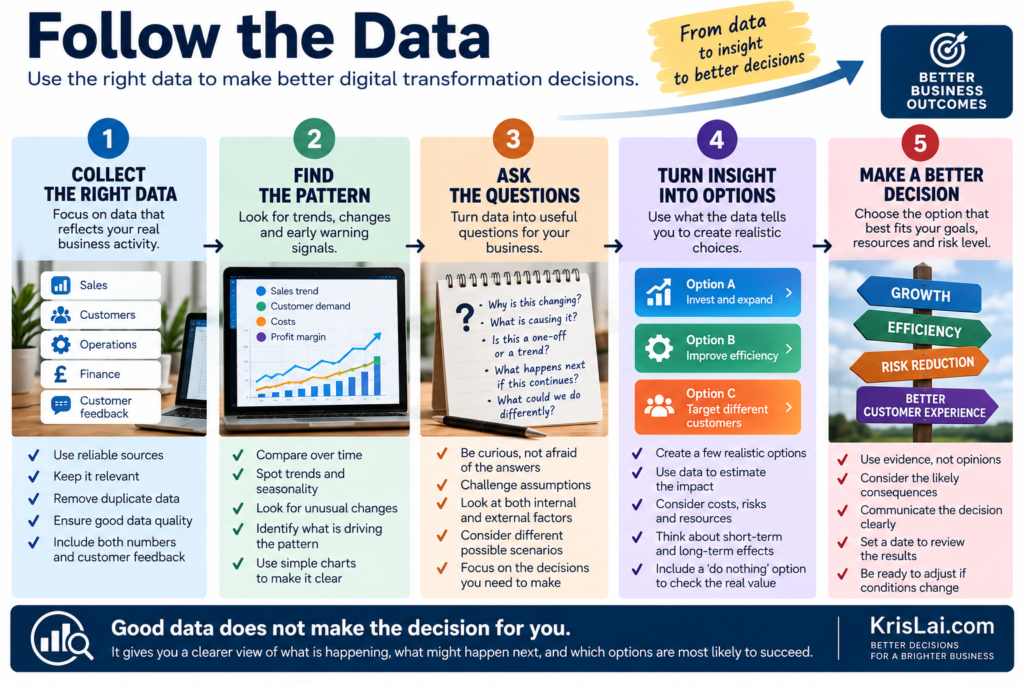
The important point is that data does not make the decision for you. It helps you see what is happening, challenge assumptions, compare realistic choices, and understand the likely consequences before you act. That is where data becomes useful to digital transformation rather than simply something the business collects.
You need to be able to answer one simple question:
“When somebody in this business needs the truth, do they know where to find it?”
If the answer is no, that is your next digital transformation problem.
5. Will our people and customers actually use the change?
Technology creates value only when people use it properly. Before changing a system, involve the people closest to the process, understand their concerns, explain what the change improves, provide practical training, and watch for unofficial workarounds. Customer behaviour matters too: a technically better process can still fail if customers dislike using it.
This is where many transformation programmes become surprisingly human.
Leadership says:
“The new system is live.”
Staff think:
“The old spreadsheet was quicker.”
A month later, both are being used.
Now you have two versions of the truth.
Government research into technology adoption among UK SMEs found that businesses value reliable, personalised support throughout the adoption journey, while the SME Digital Adoption Taskforce identified barriers including perceived complexity, implementation costs, lack of expertise, and the risk of switching systems.
Look for behavioural signals
After introducing new technology, watch for:
- staff continuing to use old spreadsheets
- people entering the minimum possible information
- workarounds
- duplicate systems
- complaints about extra clicks or steps
- managers asking for manual reports
- customers bypassing the new channel
Those are not merely annoying behaviours.
They are signals.
They may be telling you:
the system is badly designed;
training is weak;
people do not understand the benefit;
or the old process was actually easier.
Ask employees before implementation
Try:
“What would make this process easier for you?”
You may learn more from that question than from another software demonstration!
A digital project can be technically correct and behaviourally wrong. If people do not trust it, understand it, or see how it helps them, they will create workarounds. Successful transformation therefore changes both the system and the behaviour around the system.
6. What will this really cost — and what risks are we accepting?
The true cost of digital transformation includes far more than the software subscription. Leaders should include setup, data migration, integration, training, management time, process disruption, support, cybersecurity, switching costs, and ongoing maintenance. Compare those costs with a clearly defined financial or operational benefit before approving the investment.
A £50-a-month subscription can be cheap.
A £50-a-month subscription that causes 80 hours of implementation work may not be.
Calculate the full cost
Include:
Software
Licences and subscriptions.
Implementation
Setup and configuration.
Migration
Moving and cleaning existing information.
Integration
Connecting other systems.
Training
Time and external support.
Management time
Often forgotten because apparently managers work for free!
At least according to some project budgets…
Disruption
Temporary loss of productivity while the process changes.
Ongoing support
Maintenance, licences, consultants, or internal administration.
Exit cost
What happens if you later want to leave the supplier?
Use a basic value equation
For a simple business case:
Annual value created = time saved + errors avoided + additional contribution or revenue protected − full annual cost
It does not need to be perfect.
It needs to be good enough to expose unrealistic assumptions.
Then consider risk
Digital transformation can increase exposure to:
- cyber attacks
- data loss
- privacy problems
- supplier dependence
- service outages
- poor AI outputs
- access-control mistakes
- business interruption
Every new connection creates potential value.
It can also create another dependency.
That is why cybersecurity belongs inside the transformation decision, not in a separate conversation six months later.
For a practical cyber-risk framework, see:
Cybersecurity for Businesses: 7 Decisions Leaders Must MakeBuying a separate tool for every small problem can create its own problem: duplicated data, subscription creep, fragmented workflows, security exposure, and confused staff. Before adding another platform, ask whether an existing system already performs the job or whether one better-integrated system could replace several.
7. How will we prove value before we scale?
Prove digital transformation value by measuring the current baseline, defining one or two meaningful outcomes, running a limited pilot, and comparing the result. Set a review date and decide in advance what would justify scaling, changing, or stopping the project. Do not measure success simply by whether the technology was installed.
This is the question that separates technology adoption from business improvement.
Imagine implementing automated customer reminders.
Do not measure:
“Reminder system successfully installed.”
Measure:
- fewer missed appointments?
- less staff time spent chasing?
- faster payment?
- fewer customer complaints?
Those are outcomes.
Use this five-part test
1. Baseline
What happens today?
Example:
12% of appointments require staff to chase manually.
2. Target
What improvement do we want?
Example:
Reduce manual chasing to below 4%.
3. Pilot
Test the new process with one team, service, customer group, or location.
4. Review date
Decide when you will examine the result.
5. Decision rule
Before starting, agree what happens next.
For example:
Scale: if admin time falls by at least 30% without reducing customer satisfaction.
Adjust: if the process improves but staff report important problems.
Stop: if the financial or operational gain does not justify the cost.
That last option matters.
Stopping a weak project is not transformation failure.
Continuing a weak project because “we have already spent the money” may be.
So, before you invest in any new system, tool, or AI platform, these are the seven questions I believe every SME leader should stop and ask first:
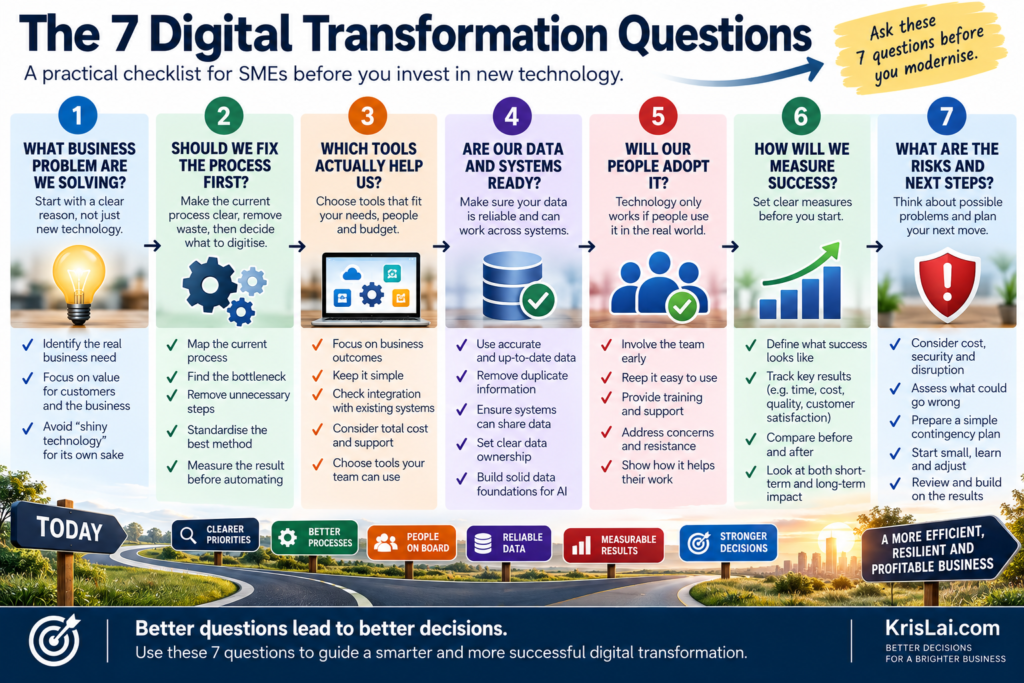
This summary connects closely to how I think about decisions more broadly in the KrisLai Decision Framework™.
If you remember nothing else from this article, remember these seven questions. They will save you time, money, and a lot of avoidable frustration!
How does digital transformation improve operational efficiency?
Digital transformation improves operational efficiency when technology removes unnecessary manual work, shortens process time, reduces errors, improves information flow, or helps existing capacity produce more useful output. The biggest gains usually come from redesigning a specific workflow rather than applying technology broadly without understanding the bottleneck.
Good candidates often include:
- quotations
- scheduling
- order processing
- staff timesheets
- invoicing
- expense processing
- customer updates
- stock management
- reporting
- document approval
I would start by measuring:
Time
How long does the process take?
Touchpoints
How many people handle it?
Errors
How often must something be corrected?
Waiting
Where does work sit idle?
Re-entry
Where is the same information typed again?
Exceptions
What causes the process to break?
That creates the link between digital transformation and operational efficiency.
Technology is the tool.
The operational outcome is the goal.
For a deeper guide, see:
Maximising Operational Efficiency: Cost-Effective Strategies for Small BusinessesHow does AI change digital transformation?
AI changes digital transformation by adding the ability to analyse, summarise, generate, classify, forecast, and support decisions, rather than merely storing or moving information. For SMEs, its biggest value is often improving existing workflows rather than building complicated AI systems from scratch. The business problem should still come first.
One important change is that technology can now support work that previously required human interpretation.
For example:
A traditional system stores customer complaints.
AI may group them into recurring themes.
A traditional CRM records customer activity.
AI may summarise the history before a sales call.
A dashboard displays sales.
AI may help identify unusual patterns worth investigating.
But the same rule remains:
Do not start with AI!
Start with the task.
Then ask:
Could normal automation solve it?
Would AI add useful judgement or pattern recognition?
What happens if the answer is wrong?
Who checks it?
How will we measure the improvement?
That is a much safer path than attaching AI to every process because the software brochure has acquired a sparkle icon.
How does digital transformation affect the Future of Search?
Digital transformation increasingly affects how customers discover and evaluate businesses, not just how work happens internally. AI search tools can answer questions, compare options, summarise reviews, and recommend providers before a customer visits a website. SMEs therefore need digital systems and content that support both operational efficiency and modern customer discovery.
This matters because the customer journey itself is changing.
A buyer might once have searched:
“best commercial cleaning company near me”
and clicked through ten websites.
Now that buyer may ask an AI system:
“Compare commercial cleaning providers suitable for a 40-person office and tell me what questions I should ask.”
The technology is doing some of the comparison.
That affects:
- content
- reviews
- pricing information
- structured data
- brand trust
- customer service
- response speed
So digital transformation should not only ask:
“How do we make our internal processes more efficient?”
It should also ask:
“How are customers now discovering, judging, and interacting with us?”
For more on that change, see:
How AI Is Changing Search Behaviour — And What Businesses Must Do NowWhat this looks like in real business
In real business, digital transformation often starts with everyday friction rather than a grand technology strategy. The strongest projects identify one costly delay, duplication, or customer problem, follow the information through the process, redesign the weak points, and then use technology to make the improved workflow easier to run.
Consider a 25-person service business.
A customer sends an enquiry.
Someone copies it into a spreadsheet.
A manager prepares a quotation.
If accepted, someone copies the information into the schedule.
Staff receive the job information through email or WhatsApp.
When the work is complete, somebody sends confirmation back to the office.
Admin staff update another spreadsheet.
The finance system produces an invoice.
Then somebody manually checks whether it was paid.
No individual step looks disastrous.
Together, they create:
- duplicate data entry
- delayed invoicing
- missing information
- unclear ownership
- poor reporting
- management chasing
The obvious response might be:
“We need a new system.”
I would slow that down!
First map:
Enquiry → Quote → Approval → Schedule → Delivery → Completion → Invoice → Payment
Now ask where the friction actually occurs.
Perhaps quotation approval is slow.
Perhaps scheduling is fine.
Perhaps the biggest problem is that completion data does not reach the office quickly enough to trigger an invoice.
That leads to a much more specific decision:
Connect job completion directly to invoicing.
Now we have:
Insight → problem → decision → consequence.
If the change works:
information is entered once;
invoices go out faster;
cash arrives sooner;
staff chase less;
management gets better visibility.
That is digital transformation in practical terms.
Where this goes wrong
Digital transformation usually goes wrong when the business starts with technology rather than a problem, automates a poor process, underestimates implementation effort, ignores employee behaviour, relies on weak data, adds disconnected systems, or cannot explain what success should look like. The result is often more complexity rather than less.
- The tool came before the problem. Nobody can clearly explain what business outcome it is meant to improve.
- Staff maintain shadow spreadsheets. The official system is not trusted or does not match the real workflow.
- The same information lives in several places. Nobody knows which version is correct.
- Software spending rises but cycle time does not improve.
- AI output needs to be manually rebuilt every time. The claimed efficiency does not exist.
- No baseline was measured. The business cannot tell whether performance actually improved.
- Training happens once. Adoption problems are then blamed on employees.
- Every department buys its own tool. Integration becomes somebody else’s future problem.
- The project cannot be stopped. Sunk costs replace judgement.
Government research on SME digital adoption identifies similar practical barriers, including cost, perceived difficulty, lack of expertise, and the risk involved in switching technology.
What I’ve seen is that digital failure is rarely caused by technology alone.
It is often a combination of:
bad framing;
human behaviour;
weak signals;
poor implementation;
and consequences nobody considered early enough.
Which brings us directly to the wider decision framework:
The KrisLai Decision Framework™ and digital transformation
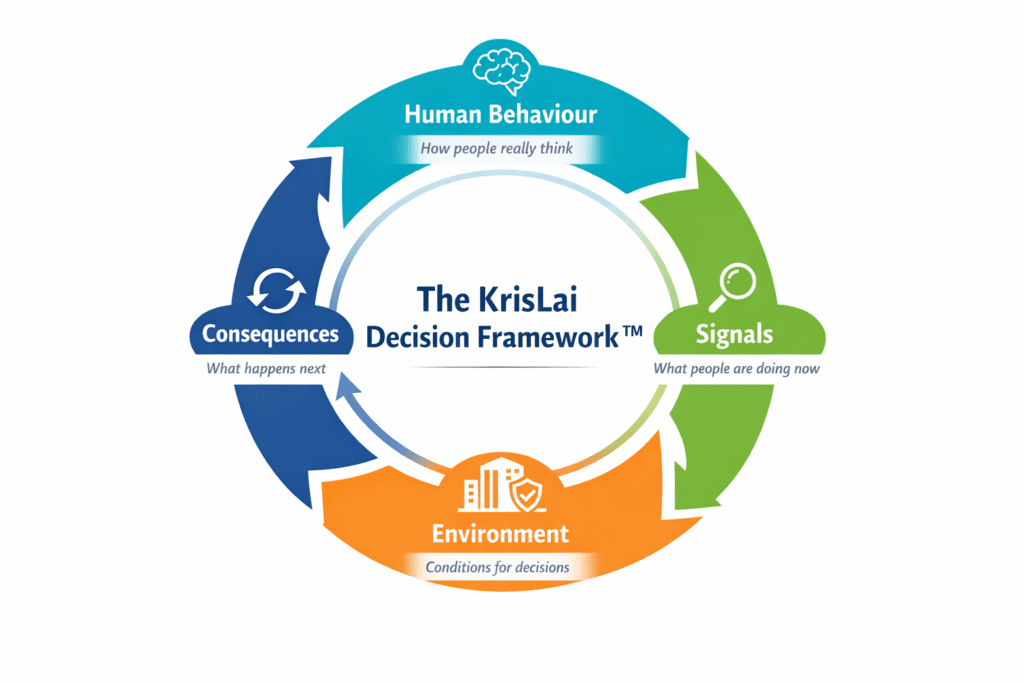
A practical model for better business decisions in complex environments. It focuses on four essential elements:
- Human Behaviour — how people actually think and decide
- Signals — what people are trying to do right now
- Environment — whether the system supports good decisions
- Consequences — what happens next, and after that
Strong decisions consider all four — not just one.
This approach is part of the KrisLai Decision Framework, a practical method for improving business decisions.
Applied to digital transformation:
Human Behaviour
Will employees use the system?
How will customers react?
What shortcuts will people take when busy?
What do people fear losing?
Signals
Look for:
- manual workarounds
- repeated errors
- customer complaints
- waiting time
- duplicate work
- low adoption
- slow decisions
Environment
Does the business provide:
- good data?
- clear ownership?
- training?
- secure systems?
- time to adapt?
- integrated tools?
Consequences
What happens next?
And after that?
Automation may save five hours of administration.
Excellent!
Does it also make the customer experience worse?
Does it create a cybersecurity risk?
Does it lock the business into one supplier?
Does it free staff to do higher-value work?
Those second-order effects matter.
Over time, I’ve found that good decisions rarely come from data alone. They come from understanding people, reading signals, creating the right environment, and thinking beyond the immediate outcome.
Better decisions always come from understanding behaviour, signals, environment, and consequences.
This connects closely to how I think about decisions more broadly in the KrisLai Decision Framework™.
Read more about the KrisLai Decision Framework™What you should actually do: the 30-Day Digital Transformation Test
Instead of launching a large transformation programme, choose one important workflow and spend 30 days understanding, improving, testing, and measuring it. The aim is not to transform the entire company in a month. It is to prove that your decision process works before committing more money, time, or organisational attention.
Week 1: Find the friction
Choose one process.
Good candidates include:
- quoting
- scheduling
- customer onboarding
- invoicing
- reporting
- staff timesheets
- customer enquiries
Ask employees:
“What part of this process wastes the most time?”
Then measure:
time;
errors;
waiting;
duplicate work;
customer problems.
Week 2: Map and redesign
Write down every step.
Then apply:
Map → Remove → Simplify → Digitise → Automate
Do not choose software until you know which steps you still need.
Week 3: Test one change
Choose a small pilot.
Perhaps:
automate one reminder;
connect two systems;
use AI to classify enquiries;
replace one spreadsheet;
create one shared dashboard.
Keep the test controlled.
Week 4: Measure and decide
Compare the result against your baseline.
Did you:
save time?
reduce mistakes?
shorten the process?
improve customer response?
improve visibility?
reduce cost?
Then choose:
Scale.
Adjust.
or
Stop.
All three can be good decisions.
Do not ask, “How can we digitally transform the business?” That question is too large to be useful. Ask, “Which one important process is causing avoidable friction, and what is the smallest change we can test that might improve it?”
People Also Ask
What is digital transformation for small businesses?
Digital transformation for small businesses is the use of technology, data, automation, and AI to redesign how work is done and improve measurable outcomes. It may improve efficiency, customer experience, decision-making, or growth, but it should begin with a business problem rather than a software purchase.
How do you start a digital transformation?
Start by choosing one important business problem. Map the current process, measure the existing performance, remove unnecessary steps, and identify where technology could help. Run a limited pilot, compare the result with the baseline, and scale only when the change produces enough value.
What processes should a small business automate first?
Good automation candidates are repetitive, predictable, high-volume tasks that require little judgement. Examples include reminders, routine data transfer, invoice generation, basic reporting, document routing, and status updates. Start with tasks that consume meaningful time or regularly create delays and mistakes.
What is the difference between digitisation and digital transformation?
Digitisation converts information or tasks into digital form. Digital transformation changes the wider process, decision, or customer experience using technology. Turning a paper form into an online form is digitisation; using the submitted information to trigger an integrated workflow is transformation.
Why do digital transformation projects fail?
Digital transformation projects often fail because leaders start with technology, automate weak processes, underestimate costs, ignore staff behaviour, use poor-quality data, add disconnected systems, or fail to define measurable success. Strong projects connect technology directly to a specific business problem and outcome.
Frequently Asked Questions
1. What is a digital transformation strategy?
A digital transformation strategy is a plan for using technology to improve specific business outcomes. It should identify the problems being addressed, the processes involved, the people affected, the technology or data required, expected costs and risks, how success will be measured, and when the business will review the result.
2. What are examples of digital transformation in small businesses?
Examples include connecting job completion to automatic invoicing, introducing online customer booking, integrating CRM and accounting systems, automating routine reminders, using AI to summarise customer enquiries, creating live management dashboards, or replacing manual scheduling with a connected workflow that staff can update in real time.
3. How does digital transformation improve operational efficiency?
Digital transformation improves operational efficiency by reducing manual work, delays, errors, duplicate entry, unnecessary handovers, and poor information flow. The strongest results usually come from redesigning a specific process first and then using technology to make that improved workflow faster, more reliable, or easier to manage.
4. What is digital transformation ROI?
Digital transformation ROI compares the measurable value created by a technology change with its full cost. Benefits may include time saved, fewer errors, faster payment, reduced operating cost, higher sales, or better retention. Costs should include software, implementation, migration, integration, training, management time, support, and disruption.
5. What are the biggest digital transformation challenges for SMEs?
Common SME digital transformation challenges include limited time and expertise, unclear return on investment, employee resistance, poor data quality, integration problems, cybersecurity risk, supplier dependence, software costs, and uncertainty about which technology to choose. Starting with one clear problem can make these challenges easier to manage.
6. What is a digital maturity assessment?
A digital maturity assessment reviews how effectively a business currently uses technology, data, connected systems, automation, and digital decision support. It helps leaders identify where processes are still manual or disconnected and determine which improvements would create the most useful next step rather than simply adding more technology.
7. How can AI help with digital transformation?
AI can support digital transformation by summarising information, drafting routine content, analysing patterns, classifying enquiries, forecasting demand, supporting customer service, and helping employees find information. It is most useful when attached to a clear workflow and outcome, with appropriate human checks where errors could have significant consequences.
8. How much does digital transformation cost?
Digital transformation costs vary widely depending on the process and technology involved. Leaders should consider software subscriptions, setup, data migration, integration, training, employee and management time, external support, cybersecurity, maintenance, and potential switching costs. A small targeted workflow improvement can often be tested before making a larger investment.
9. What KPIs should be used for digital transformation?
Useful digital transformation KPIs measure the business outcome rather than the technology installation. Examples include process time, staff hours saved, error rates, response time, invoice speed, conversion, customer satisfaction, retention, cost-to-serve, system adoption, and decision speed. The best KPI depends on the problem the transformation was designed to solve.
10. Does Making Tax Digital count as digital transformation?
Making Tax Digital is primarily a regulatory digitisation programme rather than a complete business transformation strategy. However, businesses affected by MTD can use the change as an opportunity to improve record keeping, integrate accounting processes, reduce duplicate data entry, improve financial visibility, and modernise related workflows.
Research and experience note
This article combines practical operational experience, independent research, analysis, and synthesis of current thinking on SME technology adoption, AI, data, operational efficiency, behavioural change, and business decision-making.
It is written from a decision-first perspective: technology is considered only after the problem, process, people, data, risks, and expected consequences are understood.
Reference sources
- UK Business Data Survey 2026 — Department for Science, Innovation and Technology
- Understanding Technology Adoption Among UK SMEs — GOV.UK
- SME Digital Adoption Taskforce: Final Report — GOV.UK
- Making Tax Digital for Income Tax — HMRC
- Making Tax Digital for VAT — HMRC
Related reading on KrisLai.com
Digital transformation connects closely with operational efficiency, AI adoption, cybersecurity, changing customer search behaviour, and better decision-making.
Conclusionand Final Thoughts: Modernise the decision before you modernise the business
Digital transformation does not require you to replace every system, automate every task, or introduce AI everywhere.
It requires clearer decisions.
What problem are we solving?
Should the process change first?
Where can AI or automation genuinely help?
Is the data ready?
Will people use it?
What will it really cost?
How will we know whether it worked?
Those seven questions move digital transformation away from technology hype and towards business improvement.
That is where it belongs!
I write about how better decisions are made in business — combining strategy, behaviour, and practical thinking.
Digital transformation is a good example.
The software matters.
The data matters.
AI matters.
But the quality of the decision that puts those things to work matters even more.
Use the 30-Day Digital Transformation Decision Checklist to choose one process, identify the friction, assess AI and automation opportunities, check data and people readiness, calculate likely value, and run a controlled test before committing to a larger transformation.
Choose one process that wastes time or creates repeated frustration and map every step before the end of this week. Do not buy anything yet. Understanding that one process clearly will give you a stronger starting point for digital transformation than another hour spent browsing software.
This approach is part of the KrisLai Decision Framework, a practical method for improving business decisions.
If you enjoy exploring the ideas behind better business decisions, you may find the Business Thinking Hub useful.
I help people make better business decisions through psychology, strategy, and practical thinking.
Once you understand the problem you are trying to solve, the process you want to improve, and how you will measure the result, it becomes much easier to judge whether a particular tool deserves a place in your business. The resources below may be useful starting points, depending on what you actually need.
You do not need to buy a tool simply because it appears in this list. Start with the business problem, then decide whether a particular platform genuinely fits the process you are trying to improve.
Official UK guidance
- Understanding Technology Adoption Among UK SMEs — GOV.UK
- SME Digital Adoption Taskforce — GOV.UK
- Making Tax Digital for Income Tax — HMRC
- Small Business Cyber Security Guidance — NCSC
Commercial tools worth exploring
Shopify — ecommerce, orders, inventory and automation
Useful mainly for businesses that sell products online and want commerce, inventory, fulfilment, reporting and workflow automation within one ecosystem.
Ad – affiliate link: Explore Shopify
Algomo — AI customer service and sales agents
Potentially useful for businesses exploring AI-assisted customer support, lead generation or website-based service automation connected to existing systems.
Ad – affiliate link: Explore Algomo
Decision rule: Do not ask, “Is this a good tool?” Ask, “Does this tool solve the specific problem we have measured, fit our existing systems, and create enough value to justify its full cost?”
About the author
Kris Lai is a business operator and managing director with experience in land and building surveying, facilities management, logistics, and service delivery.
Earlier in his career, he worked as a Search Engine Evaluator (via Lionbridge, supporting Google), where he assessed search result relevance, user intent, and content quality using structured evaluation frameworks. This experience gives him a rare, practical understanding of how search systems interpret signals and make ranking decisions.
In parallel, whilst working with a charity organisation, he has delivered 1000’s of structured presentations in English, Finnish, and Chinese to audiences ranging from small groups to more than 600 people, and has spent decades mentoring and developing others. This experience informs his approach to clarity, communication, and decision-making under pressure.
He writes about AI, search behaviour, business strategy, and decision-making from a practical, real-world perspective.
👉 Explore ideas connected to better business decisions:
- Digital Transformation for SMEs: 7 Questions Before You InvestDigital transformation for SMEs should start with better decisions, not more technology. This guide explains seven questions to ask before investing in AI, automation, data systems, or new software, helping you improve processes, reduce risk, and prove value before you scale.
- Cybersecurity for Businesses: 7 Decisions Leaders Must MakeCybersecurity for businesses is not just an IT issue. It is a leadership decision about protecting email, accounts, devices, backups, staff behaviour, customer data, supplier access, trust, and business continuity. This guide explains the seven cyber decisions leaders should make before a small problem becomes a costly incident.
- How AI Is Changing Search Behaviour (And What Businesses Must Do Now)AI is changing how people search, compare, and buy. Learn what this means for visibility, trust, and growth — and what businesses must do now.
- Decision-Making Framework Examples: The KrisLai Method in ActionSee the KrisLai Decision Framework in action with real business examples. Learn how behaviour, signals, environment, and consequences improve decisions.
- The KrisLai Decision Framework: A Better Way to Make Business DecisionsMaster better business decisions with the KrisLai Decision Framework. Learn how behaviour, signals, environment, and consequences shape smarter outcomes.
Similar Posts
How to Blog with AI: Tools, Techniques, and Creative Storytelling
Discover how to blog with AI and elevate your content. Explore AI blogging tools, storytelling techniques, and ways to tailor AI to health, travel, and historical blogs.
7 Steps to Build a Smarter Small Business Budget
Small business budgeting is not just about tracking costs. Used well, an annual budget becomes an early-warning decision tool. This article explains how to build a smarter small business budget, review it monthly, understand budget variance, protect cash flow, and make better decisions before financial pressure builds.
7 Cognitive Biases That Lead to Costly Business Decisions
Cognitive biases can quietly distort business decisions. Learn seven common thinking traps, how they affect strategy, and what leaders can do to avoid costly mistakes.
Resilience: The Key to Thriving in Business and Life
Resilience is the key to thriving in life and business. Learn strategies for building resilience, overcoming challenges, and adapting to change with actionable insights.
How Businesses Can Use Freelance Platforms & Expert Networks to Scale Smarter
Discover how businesses can use freelance platforms & expert networks, and talent marketplaces to access top talent, reduce costs, and drive innovation. Learn how to integrate expert networks for market research, interim management, and global expansion.
Lean Management: 7 Ways Small Businesses Cut Waste
Lean management helps small businesses cut wasted time, travel, admin, rework, stock problems, poor handovers, and unused team knowledge. This article explains the 5 lean management principles, the hidden wastes that slow small businesses down, and how to improve processes so better work becomes easier.