
You finish the day’s paid work, then face the second shift: enquiries, reports, follow-ups and tomorrow’s marketing. AI tools for small business can help with some of that work, but a quick draft only becomes useful when it produces a result you can trust. The important question is which part of your working day will actually improve.
Start with one recurring task whose result you can check. Compare tools against six criteria: the problem, integration, data protection, full cost, output quality and ease of use. Test the complete workflow, including corrections and support. Expand when the evidence shows a worthwhile improvement; stop when it does not.
I write about how better decisions are made in business, combining strategy, behaviour and practical thinking. In this guide, I will help you find a sensible starting point, compare useful tools, run a small test and decide whether to continue.
That starts with the work itself. Once you know where time, quality or customer service is suffering, choosing software becomes a much clearer decision.
An AI tool is software that uses a model to produce an output from the information it receives. That output might be a reply, a summary, a prediction or a suggested action.
Think of a capable assistant preparing work for your desk. Clear instructions and reliable source material help; you still decide whether the result is fit to use. Speed does not give the assistant authority to promise a price, approve a payment or judge a safety issue.
Most examples in this guide involve generative AI, which creates content. Other AI systems classify information or forecast patterns. The OECD’s AI definition covers these different outputs.
- Artificial intelligence: machine-based systems that generate outputs such as content, predictions or recommendations.
- Natural intelligence: intelligence in living beings, including people. In your business, human experience, context and judgement help determine what matters. See Cornell’s introduction.
- Synthetic intelligence: a term used in different ways for engineered intelligence, sometimes as another name for AI. It is not an agreed step above AI. Compare the University of Oregon glossary.
- Superintelligence: intelligence far beyond the strongest human abilities across a broad range of thinking tasks. The term describes a proposed capability; it does not by itself specify how that intelligence is made. See Nick Bostrom’s discussion.
- Artificial superintelligence, or ASI: superintelligence produced artificially. This remains a hypothetical category, rather than a product capability you can rely on when choosing today’s business software. See IBM’s explanation.
These terms do not form a neat ladder of subscription upgrades. For a small business, the practical issue is what the tool can reliably do within your workflow.
What can a small business use AI for?
A small business can use AI to draft replies, organise notes, prepare content, research options and explore business information. Some tools also help coordinate routine work or support forecasting. Start with a frequent task that has reliable inputs, a clear outcome and someone able to check the result.
Here are seven useful starting situations:
- Customer enquiries are piling up. Draft replies from approved service details, then check prices, availability and promises before sending.
- Visit notes need turning into reports. Organise recorded observations into a client update, with missing details clearly flagged.
- Marketing keeps slipping down the list. Turn an accurate article or service explanation into draft posts, slides or a short training script.
- You need to compare suppliers. Prepare a comparison from current source pages, then verify delivery terms, specifications and charges yourself.
- A spreadsheet contains useful clues. Ask for help organising or explaining approved figures; check formulas and conclusions against the underlying records.
- Enquiries arrive through several channels. Classify them for review or route clear cases to the right person, with an exception route for uncertain cases.
- Stock or demand is difficult to plan. Consider a specialist forecasting tool when you have suitable historical data, and compare its suggestions with actual outcomes.
The common thread is preparation. A first trial should let you judge whether AI improves work you already understand.
Which AI tools are best for small business?
The best AI tools for small business are those that fit a specific task, your existing software and your data requirements at an acceptable total cost. General assistants suit varied drafting work; specialist tools suit defined workflows. Treat the shortlist below as alternatives to investigate, rather than a shopping list.
This is a researched selection based on business uses and current product documentation, checked on 11 October 2026. I am not presenting it as a hands-on test of every product…
Some links in this guide are affiliate links. If you buy through them, I may earn a commission. The comparison also includes tools for which I have no affiliate relationship.
| Your task | Options to investigate | What to check |
|---|---|---|
| Drafts and supplied-document work | ChatGPT or Claude | Test the same brief. Check usage limits, source accuracy and the terms for your account. |
| Work already in an office suite | Gemini in Google Workspace or Microsoft 365 Copilot | Confirm which app, work-data and AI features your exact subscription includes. |
| Research with source links | Perplexity | Open the cited pages. Check that they actually support the answer and are current. |
| Visuals and presentations | Canva | Check AI allowances, brand fit, image accuracy and the relevant commercial-use terms. |
| Meeting notes and action lists | Fireflies — affiliate link | Set recording and sharing controls. Check names, commitments and actions. Advanced AI functions can use additional credits. |
| Customer records and follow-up | HubSpot with Breeze AI features — affiliate link | Confirm the particular feature’s plan and credit requirements. Free CRM access does not include every AI feature. |
| Connecting repeatable workflows | Zapier, with AI only where needed | Verify the connector, supported actions, task allowance and approval steps. Some work needs ordinary automation. |
For the meeting and CRM rows, consult the official Fireflies credit guide and HubSpot Agent Hub documentation before budgeting.
Specialist options when the job calls for them:
For short emails and marketing copy, Rytr is another writing option. Compare it with your existing assistant before paying for overlapping features.
For repeated onboarding or training videos, Synthesia may suit approved scripts. Its licensing policy restricts stock and synthetic avatars and voices in paid promotion, so check your intended use.
For a business heavily reliant on WhatsApp, TimelinesAI is a specialist route to investigate. CRM synchronisation and configured AI replies are different functions. Check supported conversations, automation limits and any additional messaging or AI charges in the current plans.
An extra subscription earns its place when it solves a problem your present setup cannot handle well.
Which free AI tools can a small business use?
Small businesses can try free versions of tools such as ChatGPT, Claude, Perplexity and Canva, subject to their current feature and usage limits. Free access is useful for testing approved tasks. It does not establish that an account is suitable for confidential information, team use or a dependable daily workflow.
Separate three things: an ongoing free plan, a temporary trial and AI features included in a subscription you already pay for. They create different costs and access limits.
For a practical comparison, these are the restrictions to check, reviewed on 11 October 2026:
- ChatGPT Free: check the features and limits shown in your account and the linked plan page. This guide does not assume a fixed message or upload quota.
- Claude Free: usage is session-limited, with the session cap resetting every five hours. Longer conversations, files and tools can consume the allowance faster. See Claude’s free-plan guidance.
- Perplexity Free: basic research is available, but Pro Searches and file uploads are limited. Advanced model selection and image generation require an upgrade. See the plan comparison.
- Canva Free: its shared monthly AI allowance is estimated at up to 20 Standard or Premium uses for simple, lower-consumption tasks; complex or mixed tasks can reduce that number. Ultra AI tools are excluded. Check your allowance under Settings → Billing and the current usage guide.
Begin with public material or data you have approved for that account. Try one repeatable task, then check whether the available features and limits support normal work.
An upgrade may become worthwhile when you need more reliable access, shared administration, specific controls or a feature that the pilot has shown to be useful. “It was free” is a weak reason to build an important process around it…
Your staff’s time, checking effort and customer trust all have value. Check the specific account’s data terms and settings; neither “free” nor “paid” tells you everything about training, retention or access.
How do you choose the right AI tool for your business?
Choose an AI tool by defining the work it must improve, then checking integration, data controls, full cost, usable output and staff adoption. Set essential requirements before comparing attractive features. Shortlist tools that meet those requirements and test them on representative, permitted work before committing to a wider rollout.
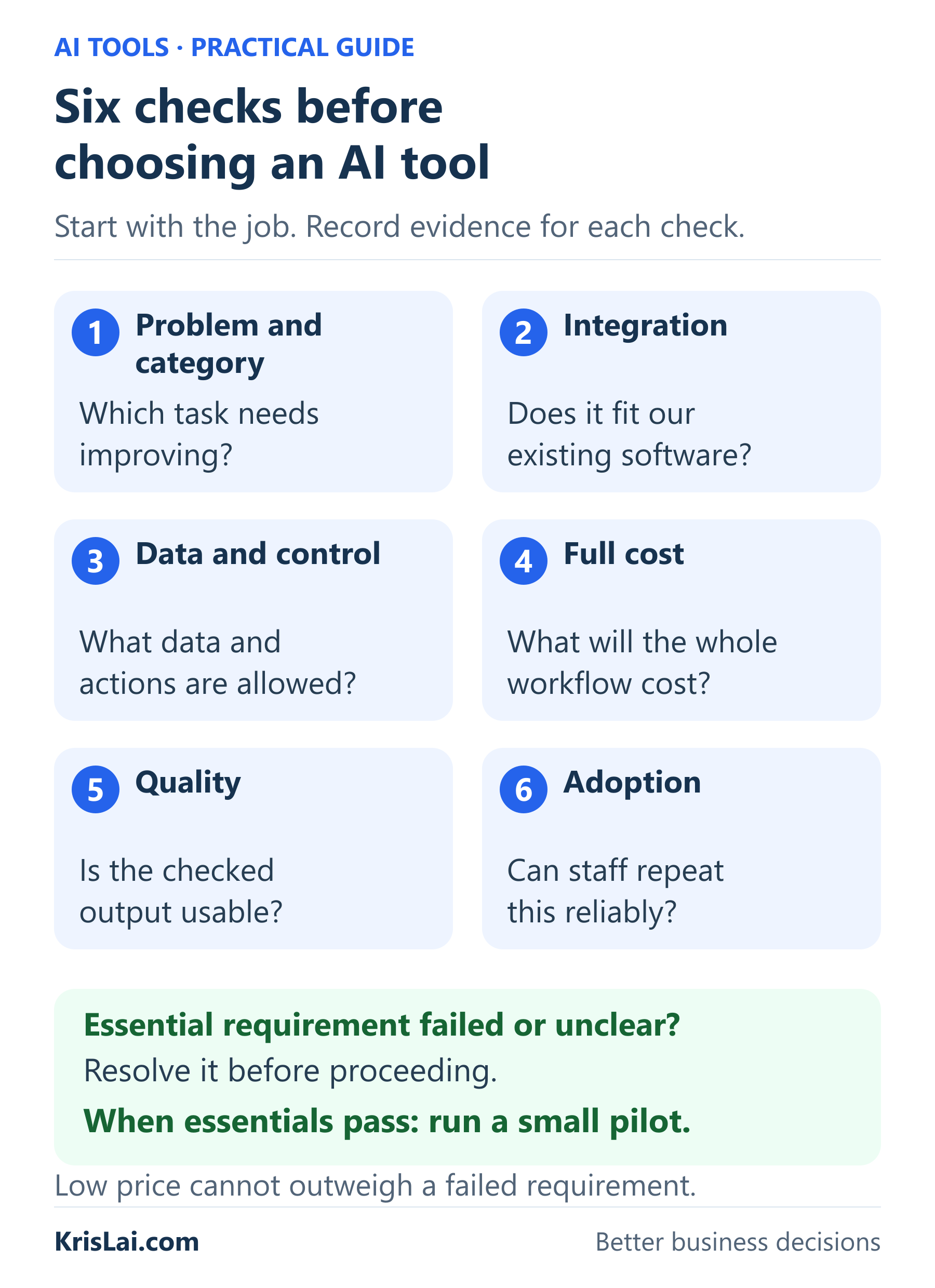
Use these six steps in order. Each one should leave you with written evidence, even if that is only a few lines in a shared document.
- Define the bottleneck and the right category
Write a specific problem: “Client reports take too long to prepare from visit notes.” Record how often the task occurs, how long it takes and what a satisfactory result contains.
Then state the desired change: “Produce a checked report faster, with the same factual accuracy and no extra customer chasing.” This gives you something to test.
Consider a better template or a process change too. If every report is delayed because a site reference is missing, fixing the notes form may help more than adding AI.
Choose the category that serves the job. A video generator will not solve slow enquiry handling, however impressive its demonstration looks.
- Check the complete handoff
Map where information starts, where the result belongs and who approves it. For example: visit notes → draft report → reviewer → client email → saved record.
Confirm that your exact software and subscription support each required action. Ask whether the tool can access the right fields, preserve attachments and leave the result in the right place.
If someone must copy, tidy and reformat everything, include that work in the test. An integration earns credit for completing the handoff you need.
- Decide what data and actions are permitted
List the inputs the task needs. Separate public material, ordinary internal information and confidential or personal information.
Check the selected account’s terms, access controls, training policy, retention and connected services. Name who can approve a new data use or an external action.
For an initial report-writing test, an approved practice record may be enough. For live customer material, resolve the relevant data and contractual requirements first. Record any unresolved issue and its owner.
- Estimate the full cost
List subscription and usage charges, setup, connections, training, checking and ongoing support. Include the cost of leaving if the tool becomes unsuitable.
Estimate the first 90 days, then repeat the calculation for a busier period or a larger team. Ask what happens if usage doubles or you add three users.
Check how to cap spending, monitor allowances and cancel. A small monthly fee can become an expensive workflow once the surrounding work is included.
- Test the quality you can actually use
Give shortlisted tools equivalent, approved briefs. Include normal work and awkward cases: missing dates, conflicting notes or a customer request outside your usual service.
Define acceptance before testing. A client report might need correct locations, supported observations, clear unknowns and no invented costs or commitments.
Record checking and correction minutes alongside mistakes. A draft that reads beautifully but needs every fact reconstructed may offer little value.
- Test whether people can repeat it
Ask the person who will do the work to complete the process using written instructions. Note where they need help and how long it takes to reach an acceptable result.
Provide a shared prompt, approved source material, a format and a review checklist. Assign someone to maintain them.
Repeat the task with another team member where practical. If only the owner can make it work, you have more preparation to do before relying on it across the business.
Put the evidence on one decision sheet
Use this compact worksheet. Mark each essential requirement pass, fail or unresolved, and add the evidence. A low price cannot compensate for a failed essential data or quality requirement.
| Check | Record before deciding |
|---|---|
| Problem and category | Task, frequency, current time, desired outcome and simpler alternatives. |
| Integration | Exact software/plan, required actions, approval point and failed-connection test. |
| Data and control | Permitted inputs, account terms, access, retention and unresolved questions. |
| Full cost | First-90-day estimate, ongoing charges, staff effort and growth assumptions. |
| Quality | Acceptance criteria, errors, checking time and correction time. |
| Adoption | Process owner, actual users, training/support needs and shared instructions. |
Below the table, record the tool and plan, reviewer, stop conditions, decision, reason and review date. Compare preferred features only after essential requirements are met.
These checks are my practical synthesis. For further background, Enate’s evaluation guide discusses costs, integration and commercial terms, while Toast’s comparison guide highlights testing tools with your own work.
This approach is part of the KrisLai Decision Framework, a practical method for improving business decisions.
Better decisions come from understanding behaviour, signals, environment and consequences. Who will use the tool? What evidence would show improvement? Does your working environment support the change? What could happen to customers, costs and trust?
Will the AI tool work with the software you already use?
An AI tool works with your existing software only if it supports the particular connection, account plan and actions your workflow requires. A familiar logo on an integrations page is insufficient evidence. Test the full handoff, including field accuracy, permissions, approval, failed connections and the route back to manual work.
First check the native connection. If you need another route, consult the official directories for Zapier, Make or n8n. Verify the supported actions on your selected plan.
For an illustrative meeting-to-CRM workflow, you might want a transcript, a checked action list and an approved customer-record update. Confirm whether the connection supports that approval point before giving it access.
Test a wrong date, a duplicate record and a disconnected account. Who notices? Does a retry duplicate an action? Can you retrieve your records and continue manually?
Those questions reveal the practical difference between software that connects and a process you can depend on.
How much do AI tools cost for a small business?
AI costs include more than a subscription: seats, usage charges, setup, integration, training, checking and ongoing support can all affect the total. Prices depend on the product, plan and workload. Estimate a complete first-90-day cost, then model higher usage before deciding whether the business benefit justifies the expense.
Keep cash payments separate from staff time valued for comparison. You may release an employee’s time without reducing payroll.
| Cost | Question to ask |
|---|---|
| Subscription and seats | How many users must we pay for? Is the commitment monthly or annual? |
| Usage | What counts towards credits or limits? What triggers additional charges? |
| Setup and integration | Who connects systems, tests them and maintains the connection? |
| Training and review | How much staff time goes into learning, checking, correcting and support? |
| Administration and exit | Who manages access, billing and changes? Can we export the work and leave? |
Also check currency, tax, renewal dates and spending alerts. Vendor support and evidence of product continuity matter when a process depends on the service.
An illustrative first-90-day estimate
Suppose your planning assumptions are two users at £20 each per month, a £10 monthly connection service and £75 of one-off setup help. The 90-day cash estimate is £120 + £30 + £75 = £225, before any applicable tax or extra usage. These are teaching figures, not quoted vendor prices.
Separately, allow four staff hours for setup, one for training and one for support each month: eight hours over the period. At an assumed £25 per hour, that is £200 of staff time for comparison. It is not automatically an extra payroll payment.
Include any review work in your full task timings. Recalculate the forecast using your own trial results and workload before renewing.
A subscription is very good at renewing itself. Your business case needs someone responsible for checking it.
Can you put customer or business data into AI tools?
You can use customer or business data only when the intended use is permitted, the selected account provides suitable controls and you have addressed your responsibilities. Check training, retention, access, contracts and connected services. Minimise the information supplied, and resolve essential privacy questions before using live confidential or personal data.
Ask five practical questions:
- Do we need this information for the task, or can we remove names and identifiers?
- Can the provider use inputs or outputs for model training under this account’s current terms and settings?
- Where is the information processed, how long is it retained, and how can it be deleted?
- Who can access or share it, including connected services and subcontractors?
- What legal, customer-contract or industry requirements apply to this use?
Check the whole data route. A transcript sent through an automation platform to a separate model provider involves more than one service.
For meetings, set appropriate notices, permissions, sharing and retention. Check any recording or consent requirements that apply before enabling a meeting assistant.
For UK readers, consult the ICO’s AI and data protection guidance and, where relevant, its international-transfer guidance. The AI guidance is under review following changes in UK law. Readers elsewhere should check their local requirements.
It does not settle retention, access, security or whether your proposed use meets applicable obligations. A paid plan or security badge also needs to be considered alongside the actual workflow and data involved.
AI assistant, AI agent or ordinary automation: which do you need?
Use an AI assistant when a person requests and reviews work, such as a draft reply. Consider an agent when a controlled process needs software to take steps towards a goal. Use ordinary automation when clear rules already determine the action. Choose the simplest approach that meets your requirements.
Take a new enquiry:
- An assistant drafts a reply for you to check.
- An agent may consult records, choose a next step and use connected tools within its permissions.
- Ordinary automation can send a fixed acknowledgement and create a task when a form arrives.
If the rule is “send this acknowledgement for every completed form”, AI may add no useful judgement. If the wording needs to reflect an unusual request, a reviewed draft may help.
Start with limited permissions. Name the actions requiring approval, keep useful logs, assign someone to monitor failures and provide a stop switch. The NCSC’s guidance on agentic AI explains why access and human control matter.
How do you test an AI tool before committing?
Test an AI tool on one bounded workflow with a recorded baseline, permitted inputs, quality requirements, a cost ceiling and clear stop conditions. Include normal tasks and difficult cases. Measure the complete process with actual users, then decide whether to stop, adjust or expand from the evidence collected.
A four-week pilot you can adapt
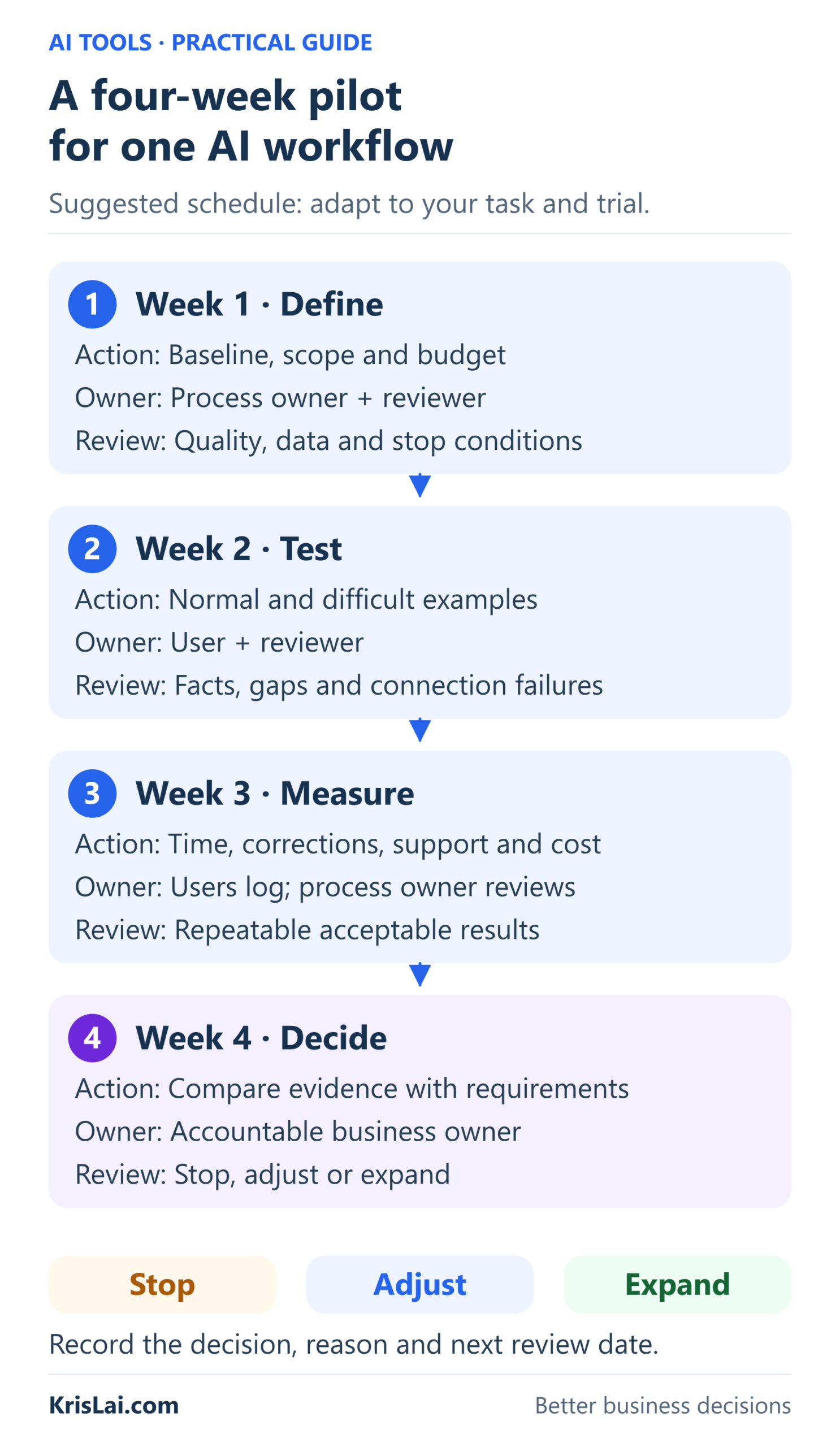
This is a suggested working schedule, not an industry standard. A vendor’s trial period may be different, and some tasks need longer observation.
| Stage | Action and owner | Review |
|---|---|---|
| Week 1: define | The process owner records the baseline, six checks, budget and boundaries. | The reviewer agrees acceptable quality, permitted data and stop conditions. |
| Week 2: test | The user runs approved normal and difficult examples through the proposed workflow. | The reviewer checks facts, missing information and connection failures. |
| Week 3: measure | Actual users record task time, corrections, support needs and usage costs. | The process owner checks whether acceptable results are repeatable. |
| Week 4: decide | The accountable owner reviews the evidence and full cost. | Record stop, adjust or expand, with a reason and a review date. |
Set your decision conditions in advance. For a draft client-report pilot, an illustrative requirement might be: every observation must be traceable to the notes, unknowns must be flagged, and every report must be reviewed before release.
Define stop conditions too. An unauthorised disclosure or external action should trigger an immediate pause and investigation. Repeated low-risk formatting problems may justify changing the template. Persistently excessive review time may justify ending the trial.
For each task, log the input type, tool and plan, prompt version, full completion time, checking/correction effort, acceptance, important errors and observed charges. Keep timings distinct so that you do not count the same minutes twice.
What my pricing test taught me about commitment
In my experience, a full schedule can hide a weak business result. In facilities management, I faced a difficult choice: increase prices and risk losing customers, or carry on fully booked while struggling to make enough profit.
I first tested a higher pricing formula on new customers when quoting for work. It did not seem to put people off; I was securing about the same amount of work as before.
Next, I re-quoted a limited number of existing customers and explained why an increase was necessary. I lost very little work. That gave me evidence to use the same approach with the remaining customers.
The result was fewer customers and less work to fit in, alongside higher revenue and higher profit.
This was a pricing decision, not an AI trial. The transferable lesson is to limit the first commitment, observe the response and widen the change when the evidence supports it. What I’ve seen is that being busy and running a healthier business do not always mean the same thing…
The Chinese saying 千里之行,始於足下 (Qiānlǐ zhī xíng, shǐ yú zúxià) is commonly rendered as “A journey of a thousand miles begins with a single step.” The Taiwan Ministry of Education dictionary traces it to Laozi. A useful AI pilot begins with a step small enough to inspect.
How do you measure whether AI is actually saving time?
Measure AI savings by comparing the time needed for an acceptable result before and after adoption. Include preparation, prompting, checking, corrections and handoffs in the AI-assisted process. Track quality and costs alongside speed. Time released becomes business value when you can explain how that capacity will be used.
Here is an illustrative calculation, not a claim about my own results:
- A report previously took 40 minutes.
- Preparing the input and generating a draft takes 10 minutes.
- Checking and correcting it takes another 20 minutes.
- The complete AI-assisted task takes 30 minutes, saving 10 minutes per report.
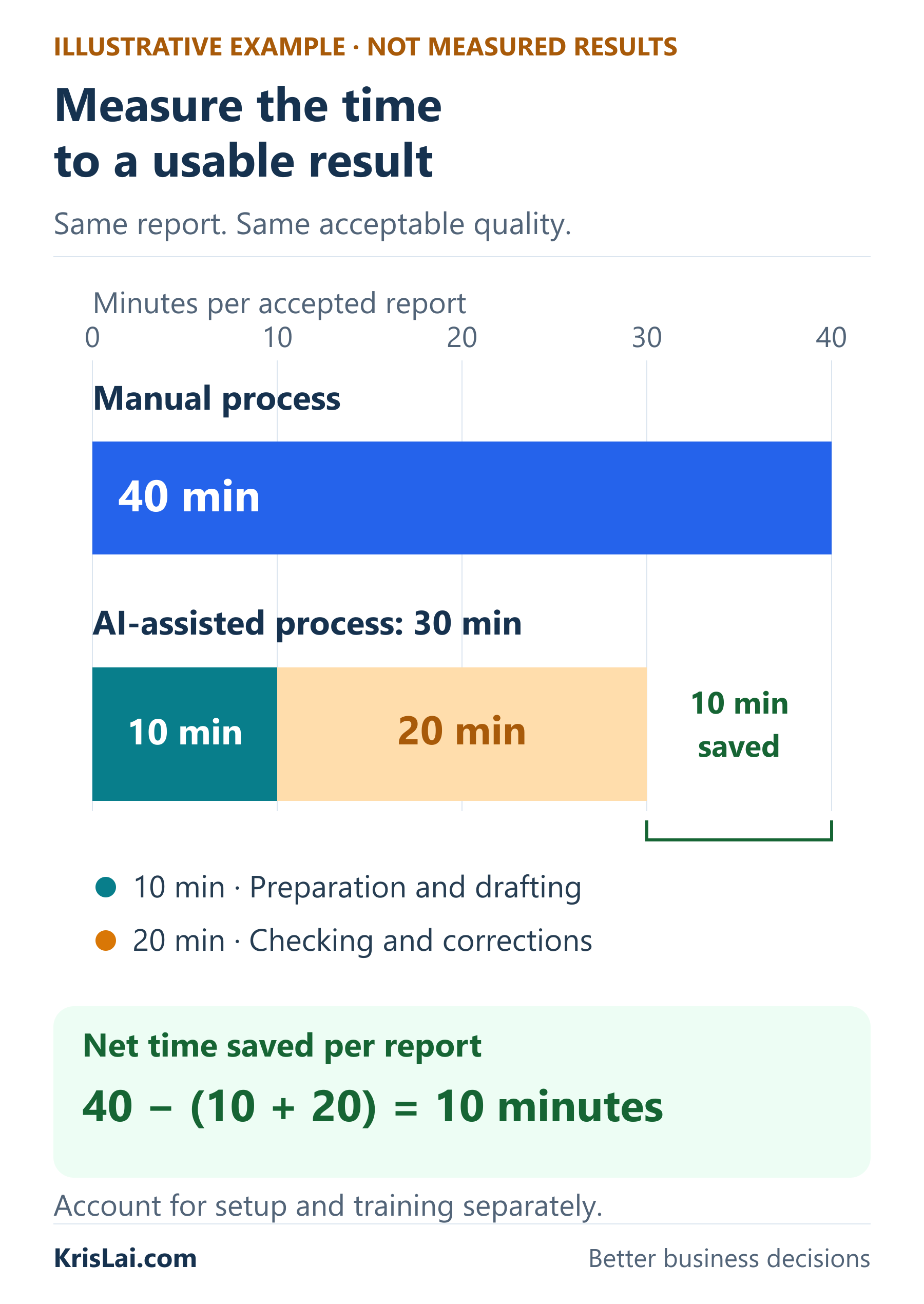
For 20 comparable reports a month, that releases 200 minutes: three hours and 20 minutes. Setup and training effort still need to be accounted for separately.
If you use “editing distance” as informal shorthand, count the work needed to check and correct the output. Text changes alone do not measure that workload. Changing one wrong price may take seconds but prevent a serious mistake. A draft needing no wording changes may still require careful verification.
Decide what the released time supports: faster replies, reduced overtime or capacity for more paid work. Do not record it automatically as a cash saving. If review time is already included in the calculation above, do not deduct the same time again.
The output of a trial is a better-supported decision. Finding that a tool adds cost, weakens quality or creates too much checking work is useful evidence before the business becomes dependent on it.
What this looks like in real business: a checked client report
Consider this illustrative service-business workflow: A technician returns from a visit with approved notes. The office needs a readable client update, but writing it repeatedly takes time.
The intended improvement is quicker preparation of an accurate report. The responsible person still makes technical or safety judgements.
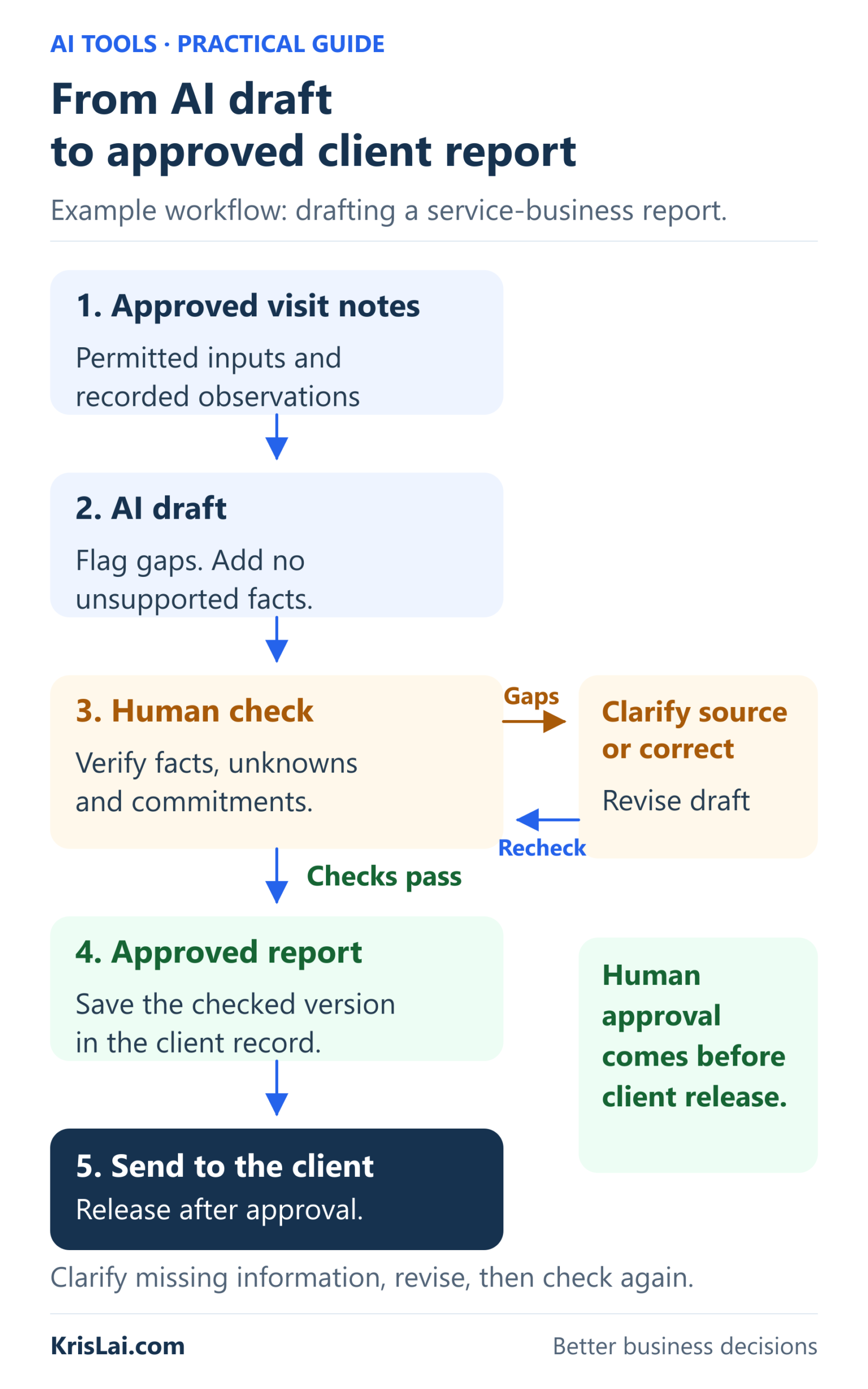
Give the assistant a bounded brief
Use an authorised account and permitted material. Supply the actual observations, known dates, audience and required sections. A prompt could be:
Draft a plain-English client update using only the approved visit notes below. Use these sections: visit details, recorded observations, proposed next steps and information to confirm.
Keep observations separate from suggestions. Flag missing or conflicting details. Do not invent a cause, measurement, price, completion date or agreement. Mark a proposed action as requiring approval unless the notes record that approval.
Audience: [client role]. Tone: clear and professional. Approved source notes: [insert permitted notes].
Suppose the notes say: “Damp patch near rear entrance. Cause not confirmed. Follow-up required. Visit date missing.”
An acceptable draft preserves the uncertainty. If it writes “A roof leak was repaired on Tuesday”, it has introduced a cause, completed work and a date that the notes do not support.
The reviewer checks the source, corrects any unsupported statement and obtains missing visit details. That effort belongs in the pilot record even if the report is only a few paragraphs long.
Make the release decision visible
Before sending, check the location, date, observations, quantities, proposed actions and any costs or commitments. Save the approved version where the business keeps its client records.
The consequence is practical: a sound report can reduce confusion and unnecessary follow-up. An invented conclusion can create expectations your business cannot meet. A fluent tone gives you no evidence that either outcome has been handled properly.
Can AI help you make better business decisions?
AI can help you organise evidence, compare options, generate questions and explore possible outcomes. Its usefulness depends on reliable inputs and careful review. Use it to challenge your thinking and expose uncertainty, then verify facts and calculations and keep responsibility for the final decision with the appropriate person.
Over time, I’ve found that good decisions rarely come from data alone. They also involve understanding people, reading signals, creating the right environment and thinking beyond the immediate outcome.
Give an assistant a decision brief: the objective, constraints, evidence, options and unknowns. Ask which assumptions are weak, what information would change the decision and what consequences each option might create.
Watch the way you frame the question. “Explain why this software is worth buying” invites support for a preferred choice. “What evidence would justify buying, delaying or rejecting it?” gives you a better starting point. Asking for criticism helps, but it does not turn an AI response into independent evidence.
This connects closely to how I think about decisions more broadly in the KrisLai Decision Framework™: make the reasoning visible before the commitment grows.
A note on AI and Power BI
For businesses already maintaining structured reporting and controlled access, Power BI Copilot is a specialist option. Microsoft’s current requirements include eligible paid Fabric or Power BI Premium capacity, administrator settings and regional availability. A Power BI Pro or Premium Per User licence alone is insufficient. Check eligibility before treating it as an inexpensive add-on.
AI and the changing way customers search
AI answers create another place where customers may encounter your business information. Use writing tools to clarify accurate service explanations, not to flood your site with interchangeable pages.
Make your services, location, scope, pricing approach and relevant experience easy to understand. Answer the questions customers ask before buying. Keep factual claims current and ensure important information is available as readable text.
For Google’s AI search features, Google’s guidance says established SEO practices remain relevant; special AI markup is not required. Eligibility does not guarantee inclusion or a citation.
The business decision is how to make your expertise useful and discoverable. Producing more generic text is a poor substitute for explaining what a customer can expect from you.
How do you introduce AI without undermining your team?
Introduce AI by involving the people doing the work, explaining the pilot’s purpose and giving them clear boundaries, training and review support. Name an owner and make mistakes easy to report. Judge adoption through completed work and user feedback, including whether the tool creates extra checking or confusion.
Ask staff where work slows down and which errors cause the most trouble. A manager may see a report as routine; the person preparing it may know how much context sits outside the form.
Create a small shared library containing an approved prompt, a good source example, brand guidance, the required output format and a review checklist. Record the version and who maintains it.
Give people permission to say, “This is taking longer” or “This draft looks convincing, but the facts are wrong.” If reporting a problem feels like failing the trial, your measurements will be unreliable.
Clear leadership turns the pilot into a learning exercise with accountable decisions. Shared prompts help consistency; they do not guarantee identical or accurate results.
Where this goes wrong
Most disappointing trials can be understood by looking at the decision around the tool:
- Buying before defining the job. Several subscriptions create activity without fixing a bottleneck. Return to one task and a measurable outcome.
- Automating incomplete records. Missing service details become faster, repeated mistakes. Repair the input process first.
- Trusting fluent wording. A polished reply can still promise the wrong price or date. Check consequential details against the source.
- Ignoring review effort. The draft takes seconds; the owner spends half an hour rebuilding it. Measure the complete acceptable result.
- Giving an agent broad authority. A misunderstanding becomes an external action. Limit access and require approval where consequences warrant it.
- Continuing because you have already paid. Setup effort can make stopping feel wasteful. Base renewal on future value and the evidence now available.
If you were choosing today, with what you now know about quality, cost and staff effort, would you still buy this tool? A previous purchase is a fact about the past. Renewal is a decision about the future.
Do I need an AI course before using business tools?
For a simple drafting pilot, begin with the vendor’s instructions, an approved practice task and clear review guidance. More complex connections or consequential work may need specialist training. Choose learning that serves the task you intend to perform.
Can AI write a business plan?
AI can help structure a plan, draft sections and raise questions about assumptions. Verify market evidence, costs, forecasts and claims yourself. A convincing plan needs a sound business case behind the writing.
Which AI is better than ChatGPT?
There is no single answer across business tasks. Compare alternatives using the same permitted brief, acceptance criteria, full cost and account requirements. The relevant result is which option works better for your process.

Frequently asked questions about AI tools for small business
What is the 30% rule in AI?
There is no universal 30% rule that determines safe or effective business AI use. The phrase is used for different informal ideas. Choose review and approval requirements according to the task, data and possible consequences, rather than applying an unexplained percentage.
What are the top five most-used AI tools for small business?
A credible popularity ranking needs a defined country, period and measure, such as active business users. ChatGPT, Claude, Gemini, Microsoft Copilot and Canva are examples worth investigating, but this guide does not claim they form a verified worldwide top five. Choose by task fit rather than popularity.
Is ChatGPT enough for a small business?
ChatGPT may be sufficient for varied drafting and approved-document tasks if the selected account meets your requirements and outputs pass review. A specialist tool becomes worth considering when you need a specific workflow, control or integration that your existing setup cannot provide adequately.
Can I use a personal AI account for business work?
Check the account’s current terms, settings and your business’s approved-use rules. A personal account may be suitable for some public or permitted tasks, but it may lack required administration or data controls. Do not assume business information is appropriate simply because the interface accepts it.
How many AI tools does a small business need?
Start with the smallest setup that solves a defined problem. One assistant or an AI feature in existing software may be enough. Add another tool when a tested requirement justifies it, and review overlapping subscriptions as your needs change.
Can I trust the sources in an AI-generated answer?
Treat source links as starting points for verification. Open the original page and check its date, authority and whether it supports the specific claim. A citation can be irrelevant or misrepresented, and an answer can omit important limitations even when the cited page is genuine.
Can AI reply to customers automatically?
Some tools can send automated replies, but that requires suitable permissions, reliable information and clear limits. Begin with reviewed drafts. Allow independent sending only for a defined use that has passed appropriate checks, with monitoring and a human handoff for uncertain or consequential cases.
Do AI tools replace employees in a small business?
AI can change particular tasks, but adopting a tool does not automatically justify removing a role. Assess the work people still perform, including judgement, customer relationships and quality control. Plan how released capacity will be used and discuss any role changes clearly with the people affected.
When should a business stop an AI pilot?
Pause immediately when required data boundaries or action controls fail. Stop or redesign a pilot when acceptable quality cannot be achieved, total costs exceed the agreed limit or checking and support erase the intended benefit. Record the evidence and preserve a workable fallback process.
What you should actually do next
Choose one recurring task whose result you can check. Write down its current time, required quality and permitted inputs. Compare a suitable existing feature with one alternative, then run a bounded pilot using the six checks and clear review conditions.
You now have a way to connect a software choice with a business outcome. A successful decision might mean adopting the tool, changing the process or keeping the current approach.
I help people make better business decisions through psychology, strategy and practical thinking. AI fits that work when it improves your ability to act with evidence and understand the consequences.
Research and experience note
This guide combines practical business experience, independent research and my analysis of how tool choices affect everyday work. The facilities-management pricing account is my own experience. The AI report workflow, pilot timetable and time-saving figures are illustrative. Tool capabilities and plan details were reviewed on 11 October 2026 and may change; use the linked documentation to check your intended purchase.
- Digital Transformation for SMEs — connect a small process improvement with the wider business.
- Business Acumen for Managers — understand the commercial consequences of a choice.
- Psychological Safety at Work — make it easier for staff to report problems and uncertainty.
- How AI Is Changing Search Behaviour — consider how customers find and evaluate business information.
- The KrisLai Decision Framework — make behaviour, signals, environment and consequences part of your reasoning.
Make your next business choice with clearer thinking about the people involved, the evidence available and the consequences of acting.
Open the sign-up page and enter your email to receive the free PDF guide.
Choosing AI can feel daunting when every tool promises to change everything. A clear decision process and one manageable test make it easier to find what helps your business.
If you enjoy exploring the ideas behind better business decisions, you may find the Business Thinking Hub useful.
About the author
Kris Lai is a business operator and managing director with experience in land and building surveying, facilities management, logistics, and service delivery.
Earlier in his career, he worked as a Search Engine Evaluator (via Lionbridge, supporting Google), where he assessed search result relevance, user intent, and content quality using structured evaluation frameworks. This experience gives him a rare, practical understanding of how search systems interpret signals and make ranking decisions.
In parallel, whilst working with a charity organisation, he has delivered 1000’s of structured presentations in English, Finnish, and Chinese to audiences ranging from small groups to more than 600 people, and has spent decades mentoring and developing others. This experience informs his approach to clarity, communication, and decision-making under pressure.
He writes about AI, search behaviour, business strategy, and decision-making from a practical, real-world perspective.
👉 Explore ideas connected to better business decisions:
- Digital Transformation for SMEs: 7 Questions Before You InvestDigital transformation for SMEs should start with better decisions, not more technology. This guide explains seven questions to ask before investing in AI, automation, data systems, or new software, helping you improve processes, reduce risk, and prove value before you scale.
- Cybersecurity for Businesses: 7 Decisions Leaders Must MakeCybersecurity for businesses is not just an IT issue. It is a leadership decision about protecting email, accounts, devices, backups, staff behaviour, customer data, supplier access, trust, and business continuity. This guide explains the seven cyber decisions leaders should make before a small problem becomes a costly incident.
- How AI Is Changing Search Behaviour (And What Businesses Must Do Now)AI is changing how people search, compare, and buy. Learn what this means for visibility, trust, and growth — and what businesses must do now.
- 7 Decision-Making Framework Examples for Business LeadersSeven practical decision-making frameworks for managers and business owners, with real business examples, guidance on when to use each model, a simple framework selector and a decision template.
- Business Decision-Making Framework: The KrisLai MethodMake more informed business decisions under uncertainty with the KrisLai Decision Framework. Explore four complementary lenses, follow a practical five-step process, and learn from my real pricing decision that reduced workload while increasing revenue and profit.
Similar Posts
Public Speaking Skills for Modern Business: Speak Clearly, Lead Better, and Present with Confidence
Learn how to improve public speaking skills for meetings, presentations, video calls, webinars, and leadership communication with practical tips for confidence, clarity, and connection.
Unlocking Success: The Path to Business Acumen Development
Unlock the secrets of business acumen development with this comprehensive guide. From understanding key concepts to practical tips and strategies, elevate your skills and drive success in today’s competitive world. Start your journey to professional growth and success now!
Elevate Your Business: Mastering Marketing and Branding for Success
Unlock the secrets to business success with our comprehensive guide on mastering marketing and branding. Discover effective digital marketing strategies, build a memorable brand identity, enhance customer relationships with CRM, and learn from top brands. Elevate your business today!
7 Steps to Build a Smarter Small Business Budget
Small business budgeting is not just about tracking costs. Used well, an annual budget becomes an early-warning decision tool. This article explains how to build a smarter small business budget, review it monthly, understand budget variance, protect cash flow, and make better decisions before financial pressure builds.
Financial Modelling: 7 Decisions Leaders Should Test First
Financial modelling is not a crystal ball. It is a decision simulator. This guide explains what financial modelling means, how leaders use financial models, which decisions to test first, how AI changes modelling, and what mistakes to avoid before committing money, time, or people.