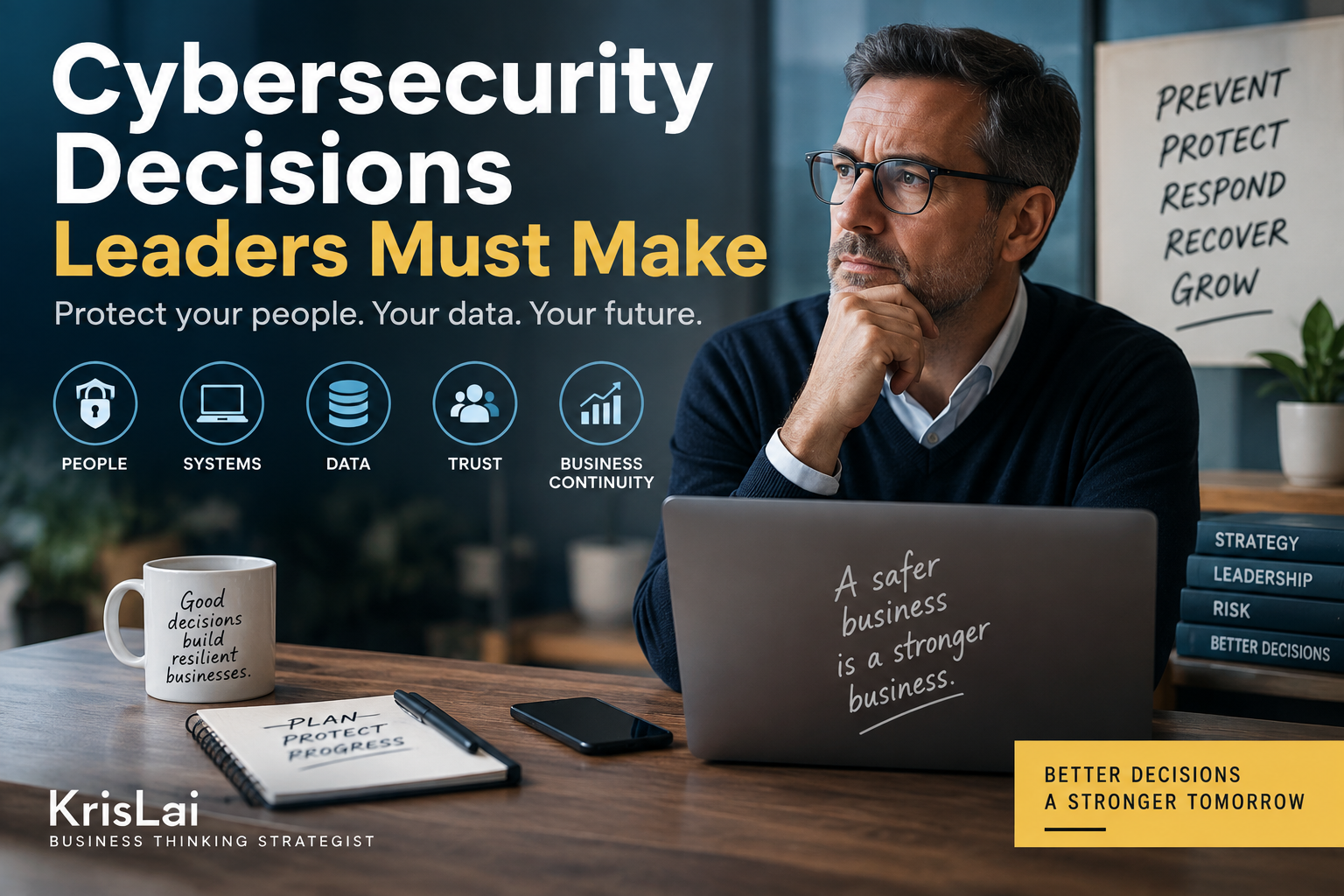
Cybersecurity for businesses is not just about software, passwords, or firewalls. It is a leadership decision about protecting customer data, cash flow, staff behaviour, supplier access, reputation, and business continuity. This guide explains the seven cybersecurity decisions leaders should make before a small problem becomes a costly incident.
Cybersecurity often sounds technical, so many business owners quietly put it in the “someone else will sort that” box.
That is dangerous!
In my experience, cyber problems rarely stay in the IT corner. They quickly become customer problems, cash-flow problems, legal problems, staff problems, and reputation problems. In other words, they become business problems.
What this article covers
- What cybersecurity means for businesses
- Why cyber security matters for SMEs and entrepreneurs
- The biggest cyber risks facing small businesses
- The seven cybersecurity decisions leaders cannot delegate
- How to prioritise cyber security using an 80/20 approach
- How to protect email, accounts, devices, data, and remote working
- What to do if your business suffers a cyber attack
- How AI is changing cyber risk and business search behaviour
- A practical 7-day cyber action plan for business leaders
Cybersecurity is no longer just an IT issue. It is a leadership decision about protecting customer trust, business continuity, staff behaviour, data, and recovery.
Table of contents
- What is cybersecurity for business?
- Why is cyber security important for businesses?
- What are the biggest cyber security risks for small businesses?
- The 7 cybersecurity decisions leaders must make
- What is the 80/20 rule in cybersecurity?
- What are the five functions of cybersecurity?
- Is Cyber Essentials worth it for small businesses?
- How does AI change cybersecurity for businesses?
- What this looks like in real business
- Where this goes wrong
- What you should actually do
- People Also Ask
- Frequently Asked Questions
- Cybersecurity is not just an IT issue. It is a leadership decision about risk, trust, continuity, and recovery.
- Small businesses should start by protecting email, key accounts, devices, backups, customer data, and staff behaviour.
- Phishing, weak passwords, account takeover, ransomware, and supplier access are major risk areas for SMEs.
- A simple incident response plan can reduce confusion when something goes wrong.
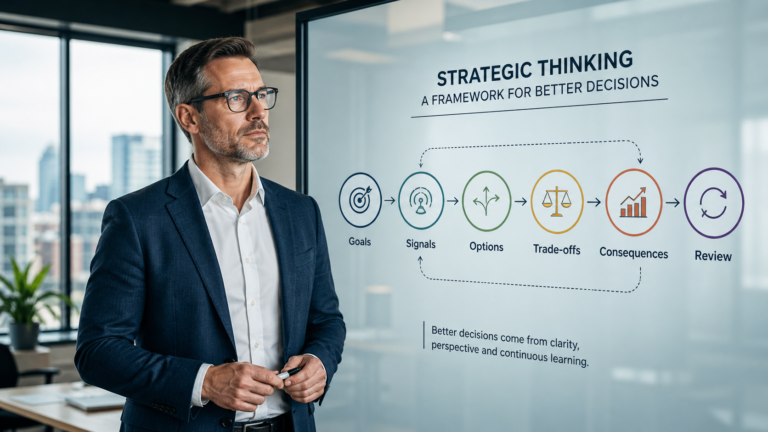
- Better decisions come from understanding behaviour, signals, environment, and consequences.
Cybersecurity for businesses means protecting the systems, devices, accounts, data, people, and processes that keep a business running. It includes preventing attacks, reducing human error, limiting access, backing up data, spotting suspicious activity, and recovering quickly if something goes wrong.
Cybersecurity is like locking the business before closing up
Think of cybersecurity like locking up your premises at the end of the day.
You would not leave the front door open, cash on the counter, customer records on the pavement, and the keys under the mat, would you?
Yet many businesses do the digital version of it every day!
They use shared passwords. They skip 2-step verification. They keep old accounts active. Staff use personal devices with no clear rules. Backups exist somewhere, possibly, if someone remembers where Dave put them.
That is not a technology problem first.
It is a decision problem.
Who owns the risk? What must be protected first? What should staff do when something looks wrong? What happens if an account is hacked on a Friday afternoon?
Those are leadership questions.
From cyber tools to cyber decisions…
Small businesses do not need to become cyber experts.
But leaders do need to make clear cyber decisions.
The question is not:
“What security tool should we buy?”
The better question is:
“What business risk are we trying to reduce first?”
Once you ask that question, cybersecurity becomes less confusing. It becomes a set of practical decisions about people, systems, habits, access, data, money, and recovery.
Cybersecurity for businesses protects the digital parts of a business that criminals, scammers, or careless mistakes could damage. It includes email security, account protection, staff training, backups, device updates, data protection, access control, supplier risk, and a cyber incident response plan.
What is cybersecurity for business?
Cybersecurity for business is the practice of protecting company data, accounts, devices, systems, staff, customers, and operations from cyber attacks, fraud, mistakes, and disruption. For SMEs, it is about reducing the most likely risks first and making sure the business can keep operating.
In plain English, cyber security protects the things your business now depends on every day.
That may include:
- email accounts
- online banking
- payroll systems
- customer records
- accounting software
- cloud storage
- mobile phones and laptops
- website and domain logins
- social media accounts
- supplier portals
- booking systems
- AI tools used by staff
For many small businesses, email is the main risk point.
Why?
Because email is where invoices, payment details, password resets, customer messages, staff instructions, supplier updates, and urgent requests often arrive.
If a criminal gets into your business email, they may not need to “hack the mainframe”, whatever that means outside a 1990s film. They may simply watch, wait, and send a convincing payment change request at the right moment.
The UK’s National Cyber Security Centre has a useful Small Organisations Guide to Cyber Security, which is a good reference point for SMEs. GOV.UK also provides a Cyber Security Guidance for Business collection.
The important point is this:
Cybersecurity is not only about stopping hackers.
It is about keeping the business trusted, working, paid, legal, and recoverable.
This framework shows the full business cyber risk cycle — from spotting weak signals early to recovering well and improving your response over time:
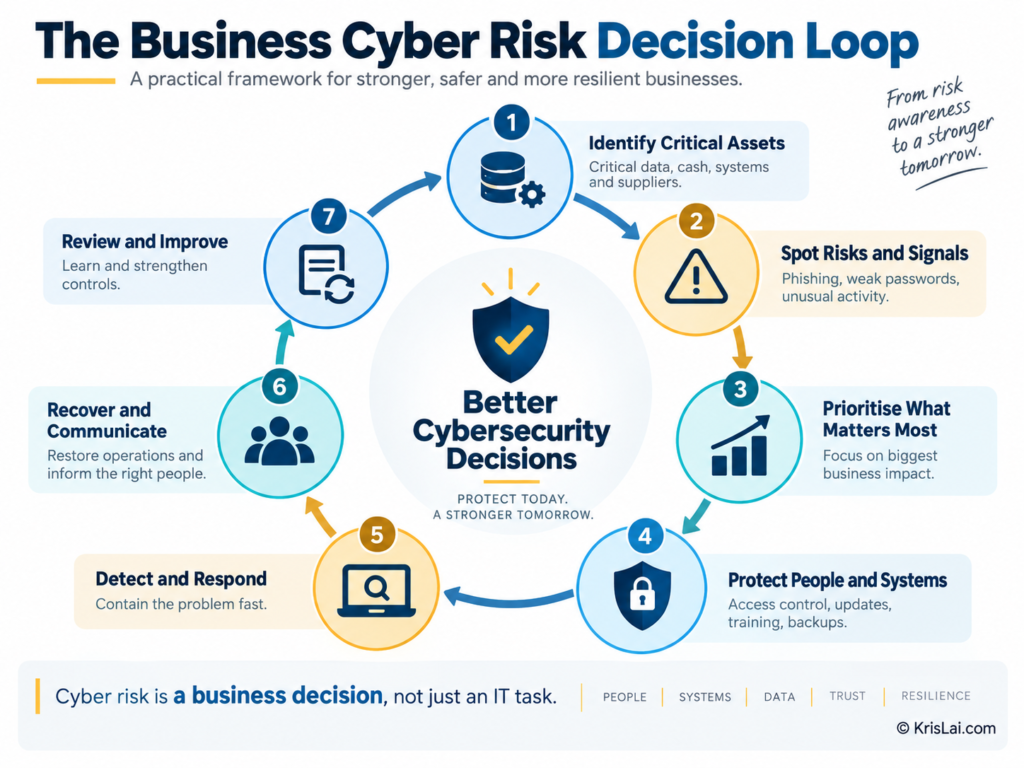
In my experience, businesses handle cyber risk better when they stop treating it as a one-off IT fix and start managing it as a leadership process.
Why is cyber security important for businesses?
Cyber security is important for businesses because a cyber incident can expose customer data, stop trading, damage reputation, steal money, disrupt staff, affect suppliers, and trigger reporting duties. Even a small incident can become expensive if the business has no clear controls or response plan.
Many business owners think cyber attacks happen only to large companies.
That belief is comforting.
It is also wrong!
Small businesses are often attractive targets because they may have weaker systems, fewer controls, and no dedicated IT or security team. Criminals do not need you to be famous. They just need you to be easy.
The UK Government’s Cyber Security Breaches Survey 2025/2026 found that phishing remained the most common type of breach or attack reported by businesses.
That matters because phishing is not just a technology issue.
It is a behaviour issue.
Someone receives a message. It looks urgent. It appears to come from a supplier, customer, manager, bank, courier, or software provider. The person clicks, replies, pays, downloads, logs in, or shares information…
One small action can create a large consequence.
For a business, the cost can include:
- lost money
- lost data
- lost working time
- lost customer trust
- system downtime
- legal or regulatory reporting
- recovery costs
- higher insurance pressure
- damage to future tenders or client confidence
In my experience, the most painful part is often not the technical fix.
It is the confusion.
Who is dealing with it? Has money been stolen? Are customers affected? Should we report it? Can staff work? Are backups safe? Who is allowed to communicate with clients?
If those decisions have not been made before the incident, everyone starts deciding under pressure.
And pressure is not always known for producing calm genius.
What are the biggest cyber security risks for small businesses?
The biggest cyber security risks for small businesses include phishing, weak passwords, account takeover, business email compromise, ransomware, outdated devices, poor backups, lost phones or laptops, unsafe remote working, supplier access, staff mistakes, and AI-generated scams that look more convincing than older fraud attempts.
Here are the risks I would put at the top of the list:
1. Phishing and fake messages
Phishing is when someone tries to trick a person into clicking a link, opening an attachment, sharing information, making a payment, or entering login details.
It may arrive by email, text, phone call, social media message, website form, or even a fake advert.
2. Business email compromise
Business email compromise happens when criminals gain access to, or impersonate, a business email account.
They may send fake invoices, change payment details, or pretend to be a supplier, director, customer, or staff member.
3. Weak or reused passwords
If one password is used across several accounts, one leak can become many compromises.
This is especially risky for email, banking, accounting software, domain hosting, and cloud storage.
4. No multi-factor authentication
Multi-factor authentication, often called MFA or 2-step verification, adds another layer of protection.
Without it, a stolen password may be enough to access an account.
5. Ransomware and malware
Ransomware can lock files or systems so the business cannot access them.
Malware can steal data, damage devices, or allow further access.
6. Poor backups
A backup is not useful just because someone says “we have backups”.
The real question is:
Can you restore from them when the business needs them?
7. Supplier and contractor access
Many SMEs use IT providers, marketing agencies, bookkeepers, freelancers, payment providers, and software platforms.
That creates access risk.
If old accounts and supplier permissions are not reviewed, the business may leave digital doors open long after the work has finished.
8. AI-assisted scams
AI can make fake messages, fake voices, fake documents, and fake supplier requests more convincing.
That means the old advice “just look for bad spelling” is no longer enough.
Some scams now have better grammar than real business emails, which is mildly insulting but also quite dangerous.
The 7 cybersecurity decisions leaders must make
The seven cybersecurity decisions leaders must make are: who owns cyber risk, which assets matter most, how email and accounts are secured, how devices and remote work are protected, what data is backed up, how staff report suspicious activity, and how the business responds to incidents.
These decisions are not glamorous.
No one is likely to put “review admin access” on an inspirational poster.
But these decisions protect the business when something goes wrong.
Before going deeper, here is a simple overview of the seven cybersecurity decisions leaders should make before a small cyber risk becomes a serious business problem:
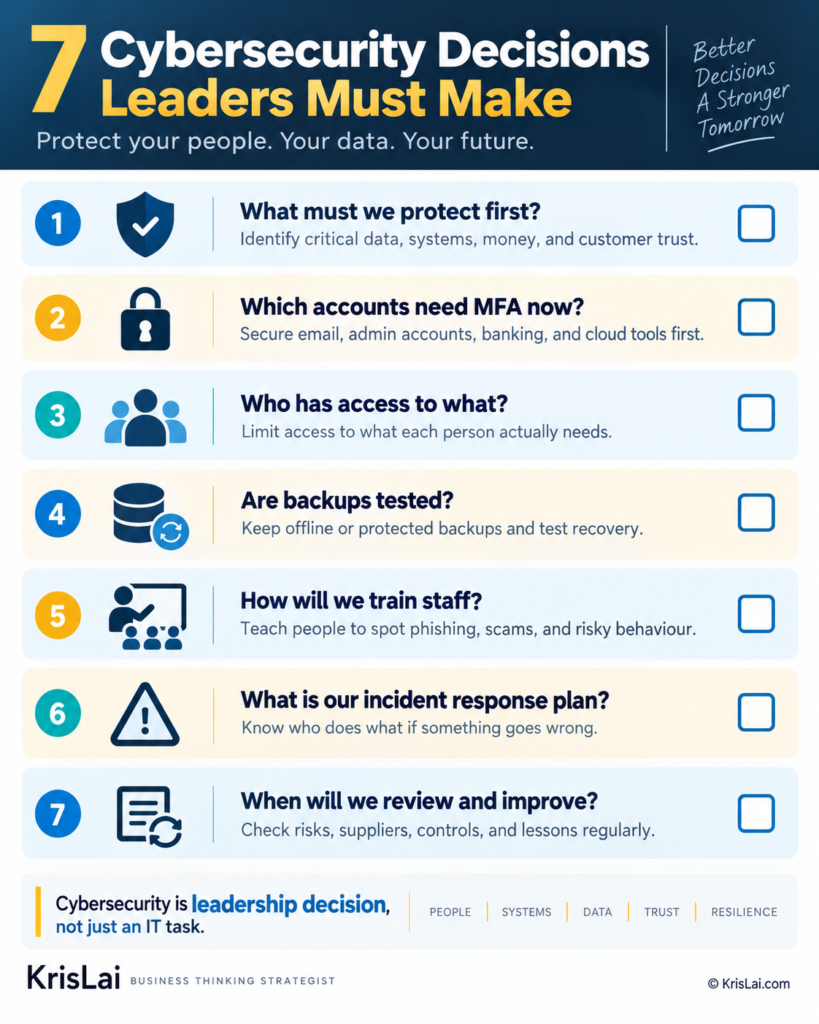
The point is simple: cybersecurity becomes easier to manage when leaders stop treating it as a vague IT concern and start treating it as a clear set of business decisions.
1. Who owns cybersecurity in the business?
Cybersecurity needs a named business owner, not just “the IT person”. IT may manage systems and tools, but a leader must decide priorities, budget, access rules, staff responsibilities, reporting steps, and what happens when something goes wrong. If nobody owns cyber risk, the business is relying on luck.
This is the first decision because every other cyber decision depends on it.
A small business does not need a full cyber department. But it does need one named person who is responsible for making sure the basics are done.
That person may be:
- the owner
- the managing director
- the operations manager
- the office manager
- a senior person who works with your IT provider
The point is not that this person becomes a technical expert.
The point is that someone must own the business decision.
For example, your IT provider may be able to set up 2-step verification. But they may not know:
- which accounts matter most to your cash flow
- which staff should have admin access
- which supplier logins are no longer needed
- which customer data would cause serious harm if exposed
- who should speak to customers if something goes wrong
- how long the business can operate without email, accounting software, or cloud files
Those are not purely technical questions.
They are business decisions.
Here is a simple example:
A small business uses Microsoft 365, Xero, online banking, a website, a CRM, and several staff mobile phones. The IT provider looks after laptops and licences.
Then a staff member leaves.
The business owner assumes IT will remove all access.
The IT provider removes the laptop login but does not know the person also had access to the CRM, shared cloud folders, social media account, website admin area, and supplier portal.
Nothing bad happens at first.
That is usually how risk behaves. Quietly. Politely. Like it has been invited in.
Three months later, nobody is quite sure who can still access what.
That is the problem.
Without ownership, access grows like weeds.
A better decision is to create a simple cyber ownership list.
| Cyber decision | Who owns it? | How often is it checked? |
|---|---|---|
| Email and key account security | Business owner / IT provider | Monthly |
| Staff access and leavers | Office manager / operations lead | Whenever someone joins, changes role, or leaves |
| Backups and restore testing | IT provider / named manager | Quarterly |
| Suspicious email reporting | All staff / named cyber owner | Ongoing |
| Incident response plan | Managing director / business owner | Every 6 months |
The leadership question is:
Who makes the cyber decision when something goes wrong?
If the answer is unclear, fix that before buying another tool.
The person who owns cybersecurity should make sure the business can answer these seven questions:
- Which accounts and systems would hurt us most if we lost access?
- Who has access to those accounts?
- Are passkeys or 2-step verification turned on?
- Are backups working and tested?
- Do staff know how to report suspicious emails or payment requests?
- Who contacts the bank, IT provider, insurer, customers, or ICO if needed?
- When did we last review this?
Do not confuse outsourcing IT support with outsourcing cyber responsibility. A provider can help protect systems, but leaders still own the business risk, customer trust, staff behaviour, supplier access, cash-flow impact, and recovery decision.
In my experience, this is where many SMEs are exposed.
They do have tools.
They do have passwords.
They do have someone “who deals with computers”.
But they do not have clear decision ownership!
That means nobody checks old access, nobody tests the backup, nobody confirms who can approve payment changes, and nobody knows who leads the response when something suspicious happens.
The decision is simple:
Name the owner. List the key systems. Agree who decides what. Review it regularly.
That one step turns cybersecurity from a vague worry into a managed business risk.
2. Which business assets matter most?
Start by identifying the accounts, devices, systems, data, and supplier access points the business cannot operate without. Protect these first instead of trying to secure everything equally. Cybersecurity for businesses becomes clearer when leaders know what would hurt most if it failed.
This is the “what do we protect first?” decision.
For most SMEs, the critical assets include:
- business email
- online banking
- accounting software
- payroll and HR systems
- customer database or CRM
- cloud file storage
- website and domain accounts
- social media accounts
- point-of-sale or booking systems
- staff laptops and phones
- supplier or contractor accounts
The NCSC’s guidance on securing important online accounts is useful here because it reminds businesses how many accounts may have built up over time.
Do this as a simple exercise.
Create a table with four columns:
| Asset or account | Why it matters | Who has access? | What protection is in place? |
|---|---|---|---|
| Business email | Invoices, customers, password resets, supplier messages | Owner, office manager, staff | Passkey or strong password, 2-step verification |
| Accounting software | Invoices, payments, tax, financial records | Owner, bookkeeper, accountant | Unique login, limited access, 2-step verification |
| Website/domain | Customer trust, enquiries, brand presence | Owner, web developer | Admin access controlled and reviewed |
This does not need to be perfect on day one.
It needs to exist.
You cannot protect what you have not listed!
3. How will we secure email and important accounts?
Business email and key online accounts should use passkeys where possible, or strong unique passwords with 2-step verification where passkeys are not available. Leaders should also remove unused accounts, avoid shared logins, review admin access, and control access when staff or suppliers leave.
This is one of the highest-impact cyber security decisions for small businesses.
The NCSC recommends using passkeys where possible. Where passkeys are not available, it recommends strong unique passwords and 2-step verification for email and important accounts: NCSC guidance on securing email.
The practical steps are:
- Turn on passkeys where supported. Use them for major accounts where available.
- Use 2-step verification. This is especially important for email, banking, cloud storage, accounting, social media, and domain accounts.
- Use a password manager. This helps create and store strong unique passwords.
- Stop sharing logins. Each person should have their own account where possible.
- Limit admin access. Not everyone needs the digital keys to the kingdom.
- Remove old accounts. Leavers, old suppliers, and unused tools should not keep access.
- Check recovery options. Make sure account recovery emails and phone numbers are current and controlled.
Do not use one shared business password for convenience. Convenience is lovely until someone leaves, a device is stolen, or one account is breached and nobody knows who did what.
The decision question is:
“Which accounts could cause the most damage if someone else controlled them?”
Secure those first.
4. How will we protect devices and remote working?
Businesses should protect laptops, phones, tablets, and shared devices with secure login, software updates, controlled access, and clear rules for remote working. Any personal device used for work should be included in the plan because business data does not become less sensitive on a sofa.
Remote working changed the risk environment.
Business data now travels through homes, phones, laptops, Wi-Fi networks, cloud apps, and personal habits.
That does not mean remote work is bad.
It means leaders need clear rules.
The NCSC’s guidance on protecting devices covers basics such as secure login and updates. For SMEs, the practical version is:
- All work devices should lock with a password, PIN, fingerprint, or face recognition.
- Software updates should be installed promptly.
- Unsupported devices should be replaced or removed from business use.
- Lost or stolen devices should be reported immediately.
- Business files should be stored in approved cloud locations, not scattered across random personal folders.
- Staff should know what they can and cannot do on personal devices.
- Admin access should be limited.
The leadership question is:
“Where does our business data go, and do we still control it when people work away from the office?”
A simple remote working cyber security checklist should include:
- Use business-approved devices where possible.
- Use secure login on every device.
- Keep operating systems and apps updated.
- Use 2-step verification for cloud tools.
- Avoid saving customer data on unmanaged personal devices.
- Report lost devices immediately.
- Remove access when someone leaves.
This is not about mistrusting staff.
It is about designing a working environment where one mistake does not become a major incident.
5. What data must we back up and restore?
A backup is only useful if the business can restore from it. Leaders should decide what data is critical, where backups are stored, who checks them, how they are protected, and how quickly the business must recover after an attack, mistake, or system failure.
Backups are one of those things everyone agrees are important.
Then someone asks when they were last tested.
The room becomes quiet.
A proper backup decision starts with this question:
“What information do we need to operate tomorrow?”
That may include:
- customer records
- invoices
- quotes
- contracts
- website data
- booking records
- payroll information
- supplier records
- working documents
The NCSC’s guidance on backing up your data is a useful starting point for small organisations.
For business leaders, the backup decision has five parts:
- What do we back up? Focus on data needed to run the business.
- Where is it backed up? Use a safe, separate backup location.
- Who controls access? Protect backup accounts with strong security.
- How often do we back up? Match the schedule to how much data you can afford to lose.
- Can we restore? Test recovery before you need it.
That last point is critical.
A backup that has never been restored is not a guarantee.
It is a hope.
And hope is not a recovery plan.
6. What should staff do when something looks suspicious?
Staff need simple rules for spotting and reporting suspicious emails, login alerts, payment changes, strange device behaviour, unexpected attachments, and urgent requests. Reporting should be fast and blame-free. The earlier people speak up, the easier it is to stop a small issue becoming serious.
This is where behavioural insight matters.
Most cyber security training fails because it tries to turn staff into security experts.
That is not realistic.
Staff need simple rules they can remember when they are busy, tired, rushed, or being pressured.
A practical rule is:
Stop. Check. Report.
Use it like this:
- Stop if a message creates urgency, fear, pressure, secrecy, or confusion.
- Check the request using a trusted number, known contact, or separate channel.
- Report anything suspicious quickly, even if you already clicked.
The NCSC explains how to spot cyber attacks and suspicious signs.
Staff should report:
- unexpected payment detail changes
- login alerts they do not recognise
- messages asking for passwords or codes
- attachments they were not expecting
- urgent requests from senior people
- customers receiving strange emails from your business
- devices suddenly behaving unusually
The leadership decision is not only “train staff”.
It is:
“Have we made it safe and easy for people to report concerns quickly?”
If staff fear blame, they may stay quiet.
That delay can make the damage worse.
In my experience, a no-blame reporting culture is one of the most practical cyber controls a small business can create.
7. What is our cyber incident response plan?
A cyber incident response plan tells people what to do if an account is hacked, data is lost, ransomware appears, a device is stolen, or a suspicious payment is made. It should cover roles, containment, reporting, recovery, communication, and lessons learned.
If a cyber attack happens, the first hour matters. This checklist gives business leaders a simple way to stay calm, reduce confusion, and protect the business while they bring in the right support:
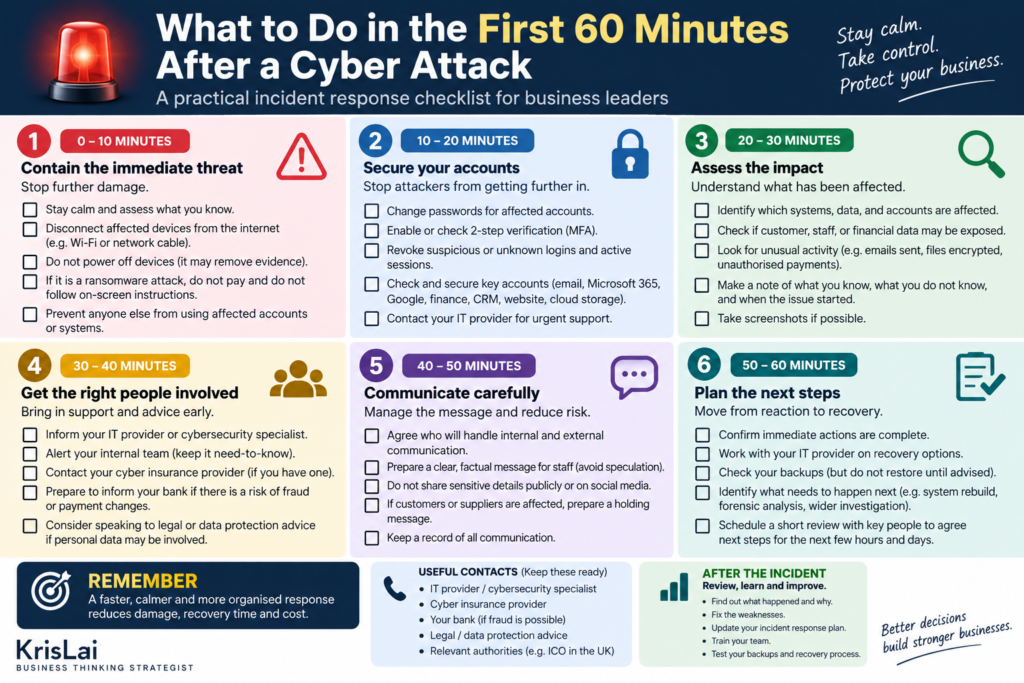
The goal is not to solve every technical problem in 60 minutes! The goal is to contain the damage, secure the most important accounts, involve the right people, and avoid making the situation worse.
A cyber incident is a terrible time to start designing a plan!
People are stressed. Systems may be down. Customers may be calling. Someone may be asking whether the bank can reverse a payment. Someone else may be asking whether GDPR applies. Someone may suggest unplugging everything. Someone will almost certainly say, “Have we tried turning it off and on again?”
Not ideal…
The NCSC has guidance on what to do when cyber attacks disrupt your organisation, including response and recovery.
For a small business, a one-page cyber incident response plan should answer:
- Who leads the response? Name the person and deputy.
- Who provides technical support? IT provider, web host, software provider, or security support.
- What should staff do first? Report, stop using affected accounts/devices, and avoid deleting evidence.
- What must be isolated? Affected email accounts, devices, cloud apps, or payment systems.
- Who contacts the bank? Especially if payment fraud may be involved.
- Who checks whether personal data is affected? This matters for ICO reporting.
- Who communicates with staff, customers, and suppliers? Avoid confused or contradictory messages.
- How do we restore operations? Use tested backups and agreed priorities.
- What do we review afterwards? Learn what failed, what worked, and what must change.
The ICO explains that some personal data breaches must be reported, and it provides guidance on personal data breaches. If personal data is involved, do not guess. Check the ICO guidance and seek proper advice where needed.
This article is practical business guidance, not legal or technical incident-response advice. If your business suffers a serious cyber incident or personal data breach, use official NCSC, ICO, Action Fraud, bank, insurer, and professional support routes as appropriate.
What is the 80/20 rule in cybersecurity?
The 80/20 rule in cybersecurity means a small number of basic controls can reduce a large share of common business risk. For SMEs, the biggest early gains usually come from securing email, using 2-step verification, updating devices, backing up data, controlling access, and training staff to report concerns.
This is a practical rule of thumb, not a formal cyber law.
But it is useful.
Most small businesses do not need to begin with advanced security dashboards and complex acronyms that make everyone feel underqualified.
They should start with the controls that reduce the most common risks.
| High-impact control | Business risk reduced | Leader’s question |
|---|---|---|
| Passkeys or 2-step verification | Account takeover | Are our key accounts protected beyond a password? |
| Strong unique passwords | Credential reuse | Are we still sharing or reusing passwords? |
| Regular updates | Known software weaknesses | Are old devices or apps creating avoidable risk? |
| Tested backups | Data loss and ransomware disruption | Can we restore what we need to run? |
| Access control | Staff, supplier, and leaver risk | Who has access, and do they still need it? |
| Staff reporting rules | Phishing damage | Would staff report a mistake quickly? |
| Incident response plan | Slow or confused response | Do we know what to do in the first hour? |
The 80/20 mindset helps leaders avoid two extremes:
One extreme is ignoring cyber security because it feels too technical.
The other is buying tools before understanding the risk.
Both are weak decisions.
Start with the controls that protect the business from common, realistic harm.
What are the five functions of cybersecurity?
The traditional five cybersecurity functions are identify, protect, detect, respond, and recover. They help leaders see cyber security as a cycle: know what matters, protect it, spot problems, respond quickly, and recover well. NIST Cybersecurity Framework 2.0 also adds “Govern” as a sixth function.
Many people still search for the five functions of cybersecurity.
The common five are:
- Identify — know your systems, data, risks, and responsibilities.
- Protect — put controls in place to reduce the chance of harm.
- Detect — notice suspicious activity early.
- Respond — act quickly when something goes wrong.
- Recover — restore operations and learn from the incident.
The updated NIST Cybersecurity Framework 2.0 added Govern, making governance more visible. You can read NIST’s overview here: NIST Cybersecurity Framework 2.0.
For SME leaders, the simple version is:
| Function | Plain-English meaning | Business example |
|---|---|---|
| Govern | Decide ownership and rules | Name a cyber owner and review access monthly |
| Identify | Know what matters | List email, banking, payroll, website, and customer data |
| Protect | Reduce likely harm | Use 2-step verification and device updates |
| Detect | Spot problems early | Watch for login alerts and suspicious payment requests |
| Respond | Act quickly | Lock accounts, contact providers, inform the bank if needed |
| Recover | Get working again | Restore from backup and review what failed |
This is helpful because it stops cyber security being treated as a one-off purchase.
It becomes a decision cycle.
Is Cyber Essentials worth it for small businesses?
Cyber Essentials can be worth it for small businesses that handle customer data, work with larger clients, bid for contracts, need cyber insurance support, or want a clear baseline for protection. It is not a magic shield, but it gives SMEs a recognised starting point.
Cyber Essentials is a UK government-backed scheme designed to help organisations protect themselves against common online threats. GOV.UK says it is suitable for organisations of any size and sector: Cyber Essentials scheme overview.
It is especially worth considering if:
- clients ask about your cyber security
- you handle personal or sensitive data
- you rely heavily on online systems
- you want a clear basic security standard
- you bid for public sector or larger business contracts
- you want to show suppliers and customers that you take cyber risk seriously
The leadership decision is:
“Would certification help us improve protection, win trust, or meet client expectations?”
Cyber Essentials should not be treated as a badge you collect and forget.
A certificate without behaviour change is like buying a smoke alarm and leaving it in the drawer.
Nice box. Not much protection…
How does AI change cybersecurity for businesses?
AI changes cybersecurity by making scams faster, more convincing, and easier to scale. It can also help businesses review risks, summarise incidents, detect patterns, and improve decision support. The danger is treating AI as harmless while attackers use it to improve phishing, impersonation, and fraud.
AI affects cyber security in two directions.
It helps defenders.
It helps attackers.
For businesses, AI can support:
- risk checklists
- policy drafting
- incident summaries
- staff training examples
- log and pattern review
- supplier comparison
- scenario planning
But attackers can also use AI to create:
- more convincing phishing emails
- fake supplier messages
- fake invoices
- voice impersonation
- deepfake-style scams
- automated social engineering
This is where changing search behaviour matters too.
Customers, employees, and business owners increasingly use AI tools to answer questions, compare options, and draft messages. That means business content, cyber advice, supplier information, and trust signals may be discovered through AI summaries as well as traditional Google search.
So your business needs two things:
- clear internal rules for how staff use AI tools with business data
- clear external trust signals that show customers and partners you take risk seriously
The cyber decision is:
“Where can AI help our thinking, and where could it create new risk?”
Do not paste sensitive customer data, passwords, private contracts, staff records, or incident details into AI tools unless your business has checked the tool, settings, privacy terms, and legal implications. AI can be useful, but careless use can create a new data risk.
What this looks like in real business
In real business, cybersecurity often appears as a simple everyday moment: an invoice email, a login alert, a lost phone, a staff member leaving, a supplier asking to change bank details, or a customer saying they received a strange message from your company.
Imagine a small service business.
It uses:
- Microsoft 365 or Google Workspace
- online banking
- accounting software
- mobile phones
- WhatsApp messages
- cloud folders
- website enquiry forms
- supplier invoices
- customer contact records
Now imagine one email account is compromised.
At first, nothing dramatic happens.
No flashing skull appears on the screen. No villain in a hoodie announces himself! Sadly, real life is less theatrical and more annoying.
The criminal may simply watch.
They may learn who pays invoices, which suppliers are trusted, when customers are billed, and how the owner writes.
Then they send a convincing message:
“Please note our bank details have changed.”
Or:
“Can you urgently approve this payment before close of business?”
Now the problem is not just IT.
It is cash flow, trust, staff behaviour, supplier control, and leadership response.
A better business decision would have included:
- 2-step verification on email
- no shared passwords
- a rule that payment detail changes must be checked by phone using a known number
- clear staff reporting rules
- a named incident owner
- a plan for contacting the bank, IT provider, insurer, customers, or ICO if needed
That is real-world cyber security.
Not fear. Not jargon. Practical decisions before the damage is done.
Where this goes wrong
Cybersecurity goes wrong when leaders treat it as someone else’s problem, ignore staff behaviour, rely on passwords alone, leave old accounts open, skip backup testing, avoid incident planning, or buy tools without deciding which business risks matter most.
The breach may be technical.
But the failure is often behavioural.
- “IT handles that.” Tools may be technical, but cyber risk is a leadership issue.
- Shared passwords. They feel convenient until access becomes impossible to control.
- No 2-step verification. One stolen password can open the door.
- Old accounts left active. Ex-staff and old suppliers should not keep access.
- Backups never tested. A backup that cannot restore is not much comfort.
- Staff fear blame. If people hide mistakes, small problems grow.
- No incident plan. Confusion wastes time when speed matters.
- AI used carelessly. Sensitive data should not be pasted into tools without clear rules.
What I’ve seen in business is that security often fails in ordinary moments.
A rushed payment.
A vague instruction.
A staff member too embarrassed to admit they clicked.
A supplier account no one reviewed.
An old laptop still in use because “it works fine”.
That is why cyber security cannot be separated from behaviour.
Systems matter. But people use the systems.
The KrisLai Decision Framework™ and cybersecurity
A practical model for better business decisions in complex environments. It focuses on four essential elements:
- Human Behaviour — how people actually think and decide
- Signals — what people are trying to do right now
- Environment — whether the system supports good decisions
- Consequences — what happens next, and after that
Strong decisions consider all four — not just one.
This approach is part of the KrisLai Decision Framework, a practical method for improving business decisions.
For cybersecurity, the framework works like this:
- Human Behaviour: How do staff actually use email, passwords, devices, files, suppliers, and AI tools?
- Signals: What warning signs appear before damage grows — suspicious emails, login alerts, payment changes, slow devices, or strange customer messages?
- Environment: Does the business make secure behaviour easy, or does pressure push people into shortcuts?
- Consequences: What happens if an account is hacked, data is exposed, money is stolen, or systems stop working?
This connects closely to how I think about decisions more broadly in the KrisLai Decision Framework™.
Over time, I’ve found that good decisions rarely come from data alone. They come from understanding people, reading signals, creating the right environment, and thinking beyond the immediate outcome.
Cybersecurity proves that point.
A phishing email is not only a message. It is a test of behaviour, pressure, systems, training, and response.
Better decisions come from understanding behaviour, signals, environment, and consequences.
What you should actually do
Business leaders should treat cybersecurity as a practical risk decision. Start by listing critical accounts, turning on passkeys or 2-step verification, removing old access, updating devices, testing backups, training staff to report suspicious activity, and writing a one-page incident response plan.
Here is a simple 7-day cyber action plan:
Day 1: List your critical accounts and systems
Write down the accounts and systems your business depends on.
Include:
- banking
- accounting
- payroll
- cloud storage
- CRM
- website and domain
- social media
- supplier portals
For each one, note who has access and how it is protected.
Day 2: Secure email and key accounts
Turn on passkeys where available.
Where passkeys are not available, use strong unique passwords and 2-step verification.
Start with the accounts that could cause the most damage.
Day 3: Remove access that is no longer needed
Check old staff accounts, old contractor access, old supplier logins, shared accounts, and unused software.
Remove what is no longer needed.
Access should match current business need, not history.
Day 4: Update devices and software
Check laptops, phones, tablets, apps, browsers, security software, website plugins, and operating systems.
Remove unsupported devices from business use.
If it no longer gets security updates, it should not hold business data.
Day 5: Check backups and restore one file
Do not just confirm that backups exist.
Test one.
Restore a file or folder and check that it works.
Then ask whether your backup includes the data needed to keep trading.
Day 6: Give staff simple reporting rules
Use plain language.
Tell staff:
- do not rush unusual payment requests
- do not share passwords or codes
- check supplier bank changes by phone using a trusted number
- report suspicious emails quickly
- report mistakes without fear of blame
The goal is fast reporting, not perfect behaviour.
Day 7: Write a one-page cyber incident response plan
Your plan should include:
- who leads
- who contacts IT support
- who contacts the bank
- who checks whether personal data is affected
- who communicates with staff, customers, and suppliers
- where backups are
- which systems must be restored first
- which official routes may be needed, such as NCSC, ICO, Action Fraud, insurer, or bank
That is not a perfect cyber programme.
But it is a strong start.
And for many small businesses, a strong start is far better than another year of “we really should do something about this”.
This article is based on practical business experience, independent research, and analysis of current cyber guidance for SMEs. It draws on NCSC, GOV.UK, ICO, Cyber Essentials, and NIST sources, then translates the main ideas into practical decisions for business owners and leaders.
People Also Ask
What is cyber security for business?
Cyber security for business means protecting the systems, accounts, devices, data, people, and processes a business uses every day. It helps reduce the risk of cyber attacks, fraud, data loss, service disruption, and damage to customer trust.
What cyber security measures should a small business have?
A small business should secure email, use passkeys or 2-step verification, create strong unique passwords, update devices, back up critical data, control access, train staff to report suspicious activity, and create a basic cyber incident response plan.
What is the 80/20 rule in cybersecurity?
The 80/20 rule in cybersecurity means that a few basic controls can reduce many common risks. For SMEs, these include email security, 2-step verification, updates, backups, access control, staff reporting, and an incident response plan.
What are the 5 C’s of cybersecurity?
There is no single official 5 C’s model used everywhere. A practical business version is: critical assets, controls, culture, continuity, and compliance. These help leaders focus on what matters, how it is protected, how staff behave, how the business recovers, and what duties apply.
What should a business do after a cyber attack?
A business should contain the issue, contact technical support, secure affected accounts, preserve evidence, assess whether money or personal data is at risk, contact the bank or insurer if needed, consider reporting routes, communicate carefully, restore safely, and review lessons learned.
Frequently Asked Questions
1. What is cybersecurity for businesses?
Cybersecurity for businesses means protecting company systems, accounts, devices, data, staff, customers, and processes from cyber attacks, fraud, mistakes, and disruption. It includes email security, passwords, 2-step verification, backups, access control, staff training, data protection, and incident response.
2. Why is cyber security important for small businesses?
Cyber security is important for small businesses because even one incident can disrupt trading, expose customer data, damage trust, steal money, or trigger reporting duties. SMEs often have limited time, cash, and technical support, so basic protection and clear response plans matter.
3. What are the biggest cyber risks for businesses?<
The biggest cyber risks for businesses include phishing, business email compromise, weak passwords, account takeover, ransomware, malware, poor backups, outdated devices, lost laptops or phones, unsafe remote working, supplier access, staff mistakes, and AI-generated scams.
4. What should be in a small business cyber security checklist?
A small business cyber security checklist should include secure email, passkeys or 2-step verification, strong unique passwords, controlled access, regular software updates, protected devices, tested backups, staff phishing awareness, supplier access reviews, and a one-page cyber incident response plan.
5. How do I create a cyber security policy for my business?
To create a cyber security policy, define who owns cyber risk, list critical systems, set password and access rules, require 2-step verification, explain device and remote working rules, define backup requirements, give staff reporting steps, and include an incident response process.
6. What is a cyber incident response plan?
A cyber incident response plan explains what the business should do if an account is hacked, data is lost, ransomware appears, a device is stolen, or fraud is suspected. It should cover roles, containment, reporting, recovery, communication, and lessons learned.
7. Is Cyber Essentials worth it for small businesses?
Cyber Essentials can be worth it for small businesses that handle customer data, work with larger clients, bid for contracts, need a recognised security baseline, or want to show customers and suppliers they take cyber risk seriously. It is a starting point, not a complete guarantee.
8. Can AI help with cybersecurity for businesses?
AI can help businesses review risks, draft policies, summarise incidents, compare options, create staff training examples, and spot patterns. But AI can also increase cyber risk through more convincing phishing, fake invoices, impersonation, and careless use of sensitive business data.
Useful reference sources
- NCSC: Small Organisations Guide to Cyber Security
- GOV.UK: Cyber Security Guidance for Business
- GOV.UK: Cyber Security Breaches Survey 2025/2026
- ICO: Security, including cyber security
- GOV.UK: Cyber Essentials Scheme Overview
- NIST: Cybersecurity Framework 2.0
- Google Search Central: Creating Helpful, Reliable, People-First Content
Related reading on KrisLai.com
Cybersecurity connects closely to decision-making, risk, behaviour, signals, AI, and business continuity. These related articles can help you build the wider thinking behind stronger business decisions:
Conclusion and Final Thoughts: Make the cyber decisions before the incident makes them for you
Cybersecurity for businesses is not about becoming paranoid.
It is about becoming prepared.
You do not need to understand every technical detail to lead better cyber decisions. But you do need to know what matters most, who owns the risk, how staff should behave, which accounts need protection, where data is backed up, and what happens if something goes wrong.
That is leadership through better thinking.
I write about how better decisions are made in business — combining strategy, behaviour, and practical thinking. Cybersecurity fits that perfectly because the strongest protection is not just a tool. It is a set of decisions made before pressure arrives.
Use this practical checklist to review your email security, key accounts, staff access, backups, supplier risk, staff reporting, and cyber incident response plan.
It is designed to help business leaders turn cyber risk into clear decisions they can act on this week.
If you enjoy exploring the ideas behind better business decisions, you may find the Business Thinking Hub useful.
I help people make better business decisions through psychology, strategy, and practical thinking.
If you enjoy exploring the ideas behind better business decisions, you may find the Business Thinking Hub useful.
About the author
Kris Lai is a business operator and managing director with experience in land and building surveying, facilities management, logistics, and service delivery.
Earlier in his career, he worked as a Search Engine Evaluator (via Lionbridge, supporting Google), where he assessed search result relevance, user intent, and content quality using structured evaluation frameworks. This experience gives him a rare, practical understanding of how search systems interpret signals and make ranking decisions.
In parallel, whilst working with a charity organisation, he has delivered 1000’s of structured presentations in English, Finnish, and Chinese to audiences ranging from small groups to more than 600 people, and has spent decades mentoring and developing others. This experience informs his approach to clarity, communication, and decision-making under pressure.
He writes about AI, search behaviour, business strategy, and decision-making from a practical, real-world perspective.
👉 Explore ideas connected to better business decisions:
- Cybersecurity for Businesses: 7 Decisions Leaders Must MakeCybersecurity for businesses is not just an IT issue. It is a leadership decision about protecting email, accounts, devices, backups, staff behaviour, customer data, supplier access, trust, and business continuity. This guide explains the seven cyber decisions leaders should make before a small problem becomes a costly incident.
- How AI Is Changing Search Behaviour (And What Businesses Must Do Now)AI is changing how people search, compare, and buy. Learn what this means for visibility, trust, and growth — and what businesses must do now.
- Decision-Making Framework Examples: The KrisLai Method in ActionSee the KrisLai Decision Framework in action with real business examples. Learn how behaviour, signals, environment, and consequences improve decisions.
- The KrisLai Decision Framework: A Better Way to Make Business DecisionsMaster better business decisions with the KrisLai Decision Framework. Learn how behaviour, signals, environment, and consequences shape smarter outcomes.
- Micro vs Macro Marketing: When to Target Broad Audiences vs Niche CustomersMicro vs macro marketing explained. Learn when to target broad audiences and when to focus on niche segments to increase conversions and grow your business.